Mail Configuration
This document describes how to configure email settings in Poweradmin.
Overview
Poweradmin supports sending emails for various purposes:
- User registration confirmations
- Password reset requests
- DNS zone changes notifications
- System alerts
Requirements
Any email that contains a link also needs interface.application_url. Links are built from that
setting alone, because a request header cannot be trusted for a URL that is sent to someone else.
From 4.2.6, 4.3.5, 4.4.1 and 4.5.0, with it unset:
- Password reset mail is not sent at all. The request is accepted and the interface still
reports success, but nothing is delivered and only a line is written to the server log. From
the same releases, superusers see a warning on the dashboard when password reset is enabled
and
application_urlis empty. - Username recovery and zone access notifications are still sent, but without their link.
See Security Policies for the reset-specific detail and Username Recovery.
Configuration Options
The mail settings are configured in the config/settings.php file under the mail section:
- enabled: Enable email functionality. Default:
true - from: Default "from" email address. Default:
poweradmin@example.com - from_name: Default "from" name. Default: empty
- return_path: Default "Return-Path" address for bounce handling. Default:
poweradmin@example.com - transport: Transport method. Options: 'smtp', 'sendmail', 'php', 'logger' (writes messages to the log instead of sending, see Email Debug Logging). Default:
php
SMTP Settings
SMTP settings live as flat keys under mail (they are not nested in an smtp subarray):
- host: SMTP server hostname. Default:
smtp.example.com - port: SMTP server port. Default:
587 - username: SMTP authentication username. Default: empty
- password: SMTP authentication password. Default: empty
- encryption: Encryption method. Options: 'tls', 'ssl', empty. Default:
tls - auth: Whether SMTP requires authentication. Default:
false
Sendmail Settings
- sendmail_path: Path to sendmail binary, including arguments. Default:
/usr/sbin/sendmail -t -i
Warning: Keep the
-tflag (it makes sendmail read recipients from the message headers).-bsputs sendmail into SMTP mode, where a piped message is silently dropped and no mail is delivered.
Example Configuration
return [
    'mail' => [
        'enabled' => true,
        'from' => 'dns@example.com',
        'from_name' => 'DNS Administrator',
        'return_path' => 'dns@example.com',
        'transport' => 'smtp',
        // SMTP settings (flat, not nested under 'smtp')
        'host' => 'smtp.example.com',
        'port' => 587,
        'username' => 'smtp_user',
        'password' => 'smtp_password',
        'encryption' => 'tls',  // 'tls', 'ssl', or ''
        'auth' => true,
    ],
];
Email Template Previews
Poweradmin can render its outgoing mail templates in the browser so you can check wording and
styling without sending anything. The page is at /tools/email-previews, under Tools.
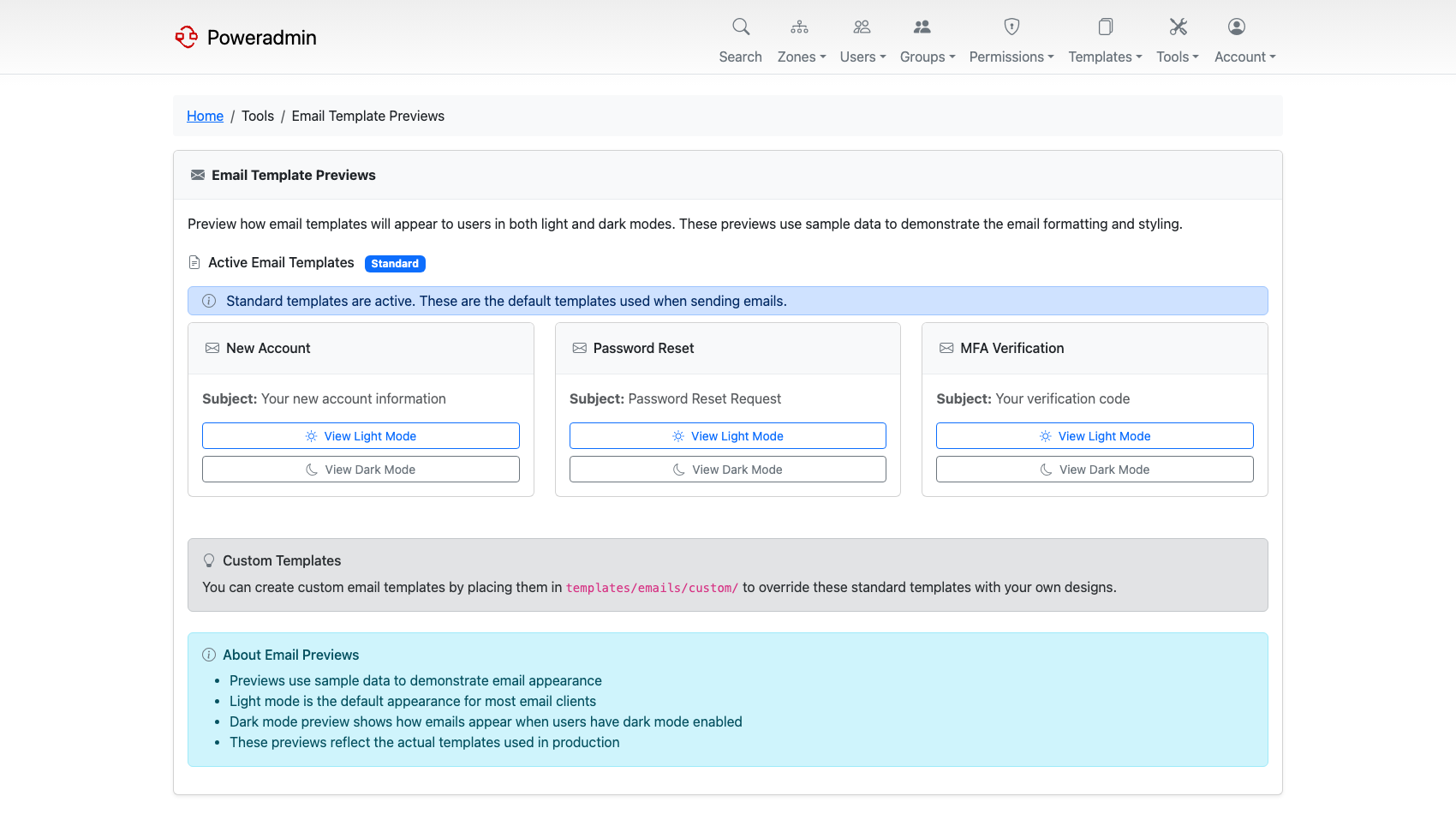
Enable the module in config/settings.php:
Note: The page is restricted to administrators (
user_is_ueberuser) whateverrestrict_to_adminis set to. That setting only controls whether the navigation entry is offered; the controller enforces administrator access regardless.
Three templates can be previewed - New Account, Password Reset and MFA Verification - each rendered with fixed sample data rather than real user details. Every preview opens standalone and can be viewed in light or dark mode; dark mode is produced by applying a CSS override to the same template, not from a separate file.
If you have added a custom template under templates/emails/custom/, the preview shows your
version instead of the shipped one and marks it as custom, which makes this a quick way to
confirm a custom template is actually being picked up.
Previews are HTML only. There is no plain-text preview, even though mail is also sent with a plain-text body.
Troubleshooting
Email Debug Logging
To troubleshoot email delivery without touching SMTP, set transport to logger. Outgoing messages are then written to the PHP error log and Poweradmin's application log instead of being sent over the network - useful for inspecting password reset content during development:
For server-side errors during real SMTP delivery, set logging.type to native and raise logging.level (see Logging), then check your web server error log or PHP error log for output from MailService. logging.type defaults to null, which discards diagnostic output no matter what the level is set to.
TLS/STARTTLS Issues (Fixed in v4.1.0)
Problem: Email sending fails with TLS/STARTTLS errors in versions prior to v4.1.0.
Solution: Upgrade to v4.1.0 or later, which includes proper TLS/STARTTLS connection handling.
If you're experiencing issues with TLS encryption:
-
Verify encryption setting:
-
Common port and encryption combinations:
- Port 587 with
'encryption' => 'tls'(STARTTLS) - Most common - Port 465 with
'encryption' => 'ssl'(SMTPS) - Older systems - Port 25 with
'encryption' => null- Not recommended
Email Rejection Due to Long Lines (Fixed in v4.0.3)
Problem: Some SMTP servers reject emails with lines longer than 998 characters (RFC 5322 limit).
Solution: Upgrade to v4.0.3 or later, which implements proper line wrapping for email content.
This particularly affects:
- Long DKIM signatures
- Extensive HTML email templates
- Large text blocks in password reset emails
Common SMTP Authentication Issues
Problem: SMTP authentication fails even with correct credentials.
Troubleshooting steps:
- Verify credentials: Double-check username and password
-
Test SMTP connectivity:
-
Check firewall rules: Ensure outbound SMTP ports are open
- Review server logs: Set
logging.typetonativeand raiselogging.leveltodebug(see Logging) for detailedMailServiceoutput - Try alternative ports: Test port 465 (SSL) or 25 if 587 fails
Email Not Being Delivered
Common causes:
- Incorrect "from" address: Some SMTP servers require matching authentication username
- SPF/DKIM issues: Ensure your server's IP is authorized to send from the domain
- Blacklisted IP: Check if your server's IP is on spam blacklists
- Rate limiting: SMTP server may be throttling connections
Debugging steps:
- Set
logging.typetonative, raiselogging.leveltodebug, and check the application log (see Logging) - Check mail server logs
- Verify email appears in sent items (if using external SMTP)
- Test with a simple mail client using same credentials
Version History
v4.1.0
- Fixed: TLS/STARTTLS connection handling (issue #861)
- Properly handles different encryption modes
- Resolves connection failures with certain SMTP servers
v4.0.3
- Added: Comprehensive debug and operational logging
- Detailed SMTP transaction logging
- Authentication process visibility
- Error message improvements
- Fixed: Email rejection due to long lines (issue #798)
- Implements RFC 5322 compliant line wrapping
- Prevents SMTP server rejections
v4.0.2
- Fixed: Invalid SMTP headers causing server rejections (issue #774)
- Removed non-standard headers
- Improved RFC compliance
- Fixed: SMTP authentication and response parsing issues
- Better error handling
- More reliable authentication
v4.0.0
- New Twig-based email template system
- Support for custom email templates
- Dark mode email templates
- Plain text body support
- Template preview functionality
- Multiple transport options (SMTP, sendmail, PHP mail)
Related Documentation
- Security Policies - Password reset and MFA email settings
- User Agreements - Agreement acceptance notifications