Client Setup
Update Methods
The Dynamic DNS update system supports several ways to update records:
- HTTP Basic Authentication
- URL parameters
- Automatic IP detection
Supported Parameters
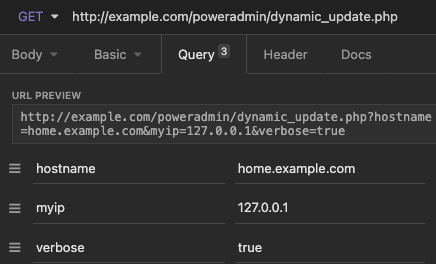
username- Your Poweradmin username (if not using HTTP Basic Auth)password- Your Poweradmin password (if not using HTTP Basic Auth)hostname- The FQDN to updatemyiporip- IP address(es), comma-separated. Either address family is accepted, and each address in the list is routed to an A or AAAA record according to its own family, so a single list may mix IPv4 and IPv6myip6orip6- IPv6 address(es), comma-separated. When supplied, this is authoritative for the IPv6 side and any IPv6 address inmyipis ignored rather than merged into itdualstack_update- Set to 1 to update both IPv4 and IPv6verbose- Include this query parameter to receive human-readable response messages. Only its presence is checked, soverbose=0enables verbose output too
Response Codes
Without verbose=1 the endpoint returns one of these short codes followed by a newline:
| Code | Meaning |
|---|---|
good <ip> |
Update accepted and a record was written. The applied IPv4 (or IPv6) address follows. |
nochg <ip> |
The record already held the supplied address, so nothing changed. |
nohost |
Hostname is not contained in any zone you own. This is also what you get when you authenticate successfully but own no zone matching the hostname. |
!yours |
The owning zone was found, but there are no matching A/AAAA records to update, or the zone is read-only (Secondary or Consumer). |
notfqdn |
The supplied hostname is not a fully-qualified domain name. |
badauth |
Authentication failed. Covers missing credentials, invalid credentials, an account without the DDNS permissions, and a temporarily locked-out login. |
badagent |
Request had no User-Agent header. |
dnserr |
A server-side validation or write error occurred. |
Note: These codes changed in 4.4.0 and 4.5.0. Poweradmin 4.3.x and earlier returned
goodfor no-op updates and split authentication failures intobadauth(no username supplied) andbadauth2(credentials rejected). From 4.4.0 onwards unchanged updates returnnochgand every authentication failure returnsbadauth;badauth2no longer exists. The trailing address ongood/nochgwas added in 4.5.0.
When debugging, always append &verbose=1 so you get the readable equivalent instead of a two-letter code.
Special Values
You can use whatismyip for the IP parameters to automatically detect your address:
curl "https://dns.example.com/dynamic_update.php?hostname=host.example.com&myip=whatismyip&verbose=1"
Multiple IP Management
The system supports managing multiple IP addresses per host:
# Update multiple IPv4 addresses
curl "https://dns.example.com/dynamic_update.php?hostname=host.example.com&myip=192.0.2.1,192.0.2.2"

# Update multiple IPv6 addresses
curl "https://dns.example.com/dynamic_update.php?hostname=host.example.com&myip6=2001:db8::1,2001:db8::2"

# Update both IPv4 and IPv6 with cleanup
curl "https://dns.example.com/dynamic_update.php?hostname=host.example.com&myip=192.0.2.1,192.0.2.2&myip6=2001:db8::1,2001:db8::2&dualstack_update=1"

# Update both families from a single myip list
curl "https://dns.example.com/dynamic_update.php?hostname=host.example.com&myip=192.0.2.1,2001:db8::1"
If any of these return a short error code like !yours or badauth, re-run the same URL with &verbose=1 appended to get a readable message.
When using multiple IPs:
- Omitted record types are preserved
- Use
dualstack_update=1to clean up both A and AAAA records - Records not included in the update are automatically removed
- An unparseable address anywhere in
myipormyip6is rejected withdnserr, and no records are changed. Since the list is the complete record set, silently skipping a bad entry would delete the record it was meant to keep, so the whole request is refused instead - Omitting a parameter and supplying an invalid one are not the same thing - the first preserves that record type, the second is a malformed request
- Records are inserted and deleted one statement at a time - the update is not wrapped in a database transaction
Using the Shell Script
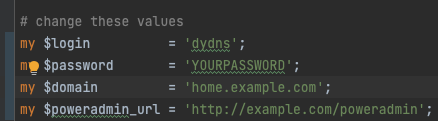
- Download the dynamic DNS client script
-
Make it executable and run:
Basic Authentication
You can also create a client that uses HTTP basic authentication with username and password.
Using ddclient (dyndns2 protocol)
ddclient and other dyndns2 clients expect the update endpoint at /nic/update. Poweradmin exposes the endpoint at /dynamic_update.php, so you need a small web-server rewrite to make stock clients work.
Apache
Add to your virtual host (or .htaccess if rewrites are enabled):
nginx
Inside the server { ... } block that serves Poweradmin:
ddclient.conf
protocol=dyndns2
use=web, web=https://dns.example.com/addons/clientip.php
ssl=yes
server=dns.example.com
login=ddns-user
password='your-password'
home.example.com
Run ddclient -daemon=0 -debug -verbose -noquiet to watch the exchange. The server returns either good\n (no IP suffix on older builds) or the dyndns2-compliant good <ip>\n depending on Poweradmin version. Both forms are accepted by ddclient.
ddclient 3.11 and later, configured for dual-stack, sends both addresses in a single myip list rather than using myip6. Poweradmin routes each address to the matching record type from 4.4.1 and 4.5.0 onwards. Earlier versions treat myip as IPv4 only and answer dnserr when it carries an IPv6 address, leaving the records unchanged - if you run an earlier version, keep the families in separate myip and myip6 parameters.
Other clients
inadyn, OPNsense's built-in DDNS client, and most router firmwares can target the same endpoint. Configure the service URL as https://dns.example.com/nic/update?hostname=%h&myip=%i (or the equivalent template for your client) and set the protocol to dyndns2 or "custom".
Client Script Installation
Shell Script
Python Script
-
Install required dependencies:
-
Run the script:
Perl Script
-
Install required modules:
-
Run the script: