API Authentication
Poweradmin supports two authentication methods for API requests: API keys
(recommended) and HTTP Basic Authentication. Both must be enabled in
config/settings.php before they can be used; see
API Configuration for the settings.
The health endpoints /api/health and /ping are the exception: they take no
credentials at all and are disabled by default. See
Health Checks.
API key authentication
API keys are the recommended method for scripts, CI, and any long-lived integration. They can be revoked individually without disrupting other clients and they do not expose user passwords.
Issuing a key
API keys are created through the web UI:
- Log in to Poweradmin.
- Go to Settings -> API Keys (
/settings/api-keys). - Click Add API Key, give it a recognizable name, and copy the value. The full key is shown only once.
A regular user can hold up to api.max_keys_per_user keys (default 5). Admin
users have no limit.
Using a key
Send the key in the X-API-Key header:
curl -H "X-API-Key: your-api-key-here" \
     -H "Content-Type: application/json" \
     https://poweradmin.example.com/api/v2/zones
Authorization: Bearer your-api-key-here is accepted as an equivalent if your
client is easier to configure that way.
The key inherits the permissions of the user it belongs to. If that user can edit zone X in the web UI, the key can edit zone X over the API; if they cannot, the key cannot either.
From 4.2.6, 4.3.5, 4.4.1 and 4.5.0 the owning account must also be active.
Deactivating the user, or deleting the account, revokes every key they hold:
the key is rejected with 401, not 403. A key whose owner can no longer be
determined is rejected the same way.
Restricting what a key can do
Available since v4.5.0.
By default a key can do everything its owner can. The add and edit forms let you narrow that down, which is what you want for a key handed to a monitoring agent, a CI job, or a single application.
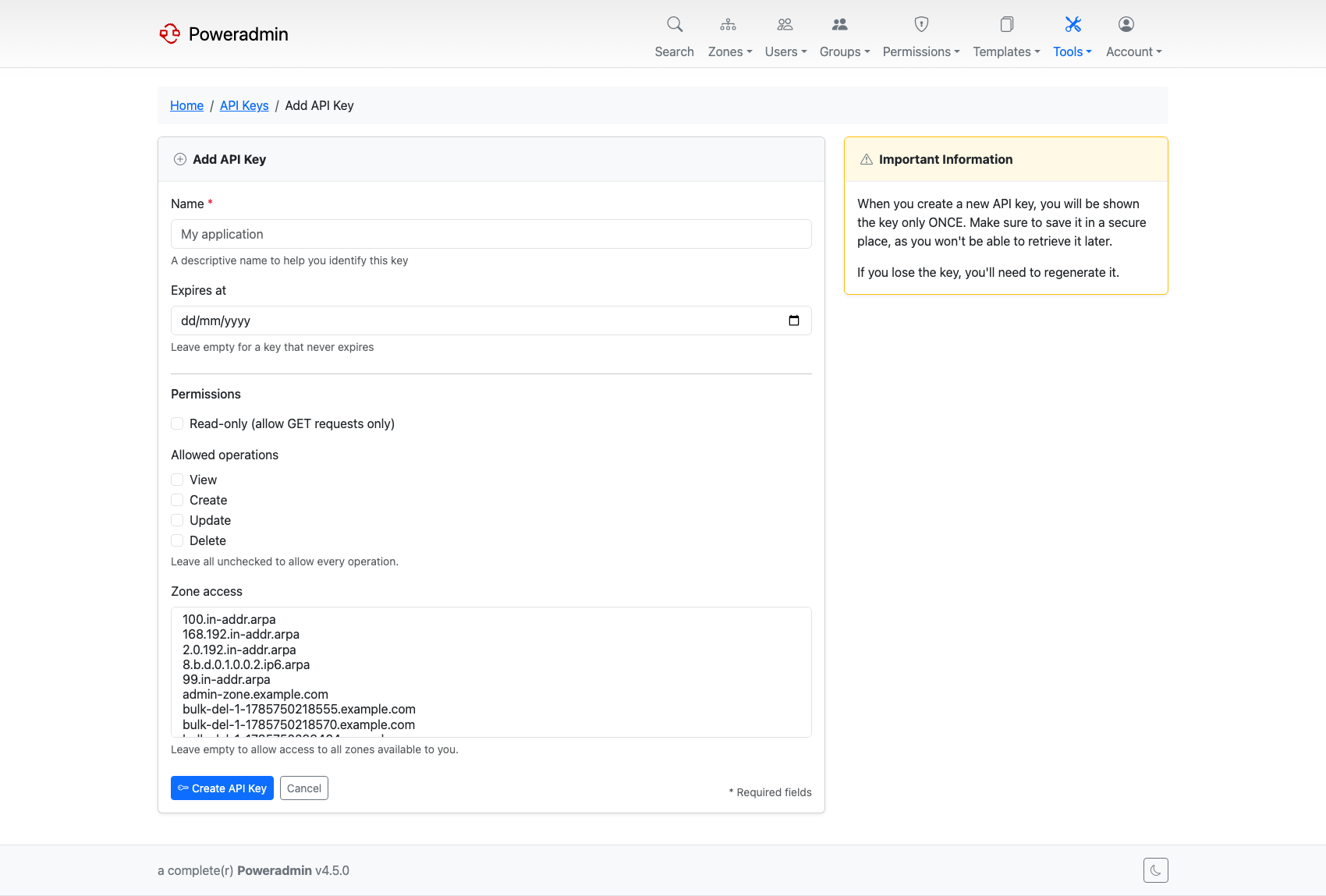
Three independent restrictions are available:
| Restriction | Effect |
|---|---|
| Read-only | Only GET and HEAD requests are accepted. Everything else gets 403. |
| Allowed operations | Tick any of view, create, update, delete. A request whose operation is not ticked gets 403. Leave all unticked to allow every operation. |
| Zone access | Select specific zones. Requests targeting any other zone get 403. Leave empty to allow every zone the owner can reach. |
Read-only and allowed-operations are checked on every API v2 request. Zone access applies to the endpoints that address a zone - zones, records, RRsets, DNSSEC, metadata, owners, and a group's zone assignments. Endpoints for users, groups, permissions, permission templates and zone templates are not zone-scoped resources, so a zone restriction does not narrow them; restrict those with the operations list instead. Listing endpoints that can filter, such as a group's zones, return only the zones in scope rather than refusing the whole request.
Operations map onto HTTP methods: POST is create, PUT and PATCH are update,
DELETE is delete, and everything else is view. Endpoints that do more than one
thing in a single request, such as a dynamic DNS upsert or a bulk record change,
must satisfy every operation they perform.
Replacing an RRset and dynamic DNS updates need create and update. When the
new set has fewer records than the current one, records are removed, so the key
also needs delete. Replacing two A records with one needs it, and so does a
dual-stack dynamic DNS update that sends only an IPv4 address and would clear the
AAAA records. Replacing records with the same number of new ones, or changing the
TTL, only needs create and update.
Restrictions only narrow access - they never widen it. A read-only key belonging to a user with no zone permissions still cannot read anything.
Existing keys are unrestricted after an upgrade, so nothing changes until you edit a key and apply restrictions.
Note: These restrictions are enforced on API v2 only. API v1 was removed in 4.5.0 and answers
410 Gone.
Rotating and revoking keys
From Settings -> API Keys you can:
- Regenerate a key (invalidates the old value, issues a new one)
- Disable a key temporarily without deleting it
- Delete a key permanently
Deactivating the owning user revokes all of their keys at once, which is the coarsest option when an account rather than a single key is the concern.
Rotate keys on a schedule that matches your security policy, and revoke immediately if a key may have leaked.
HTTP Basic Authentication
When api.basic_auth_enabled is true, the API also accepts standard HTTP
Basic Auth with a Poweradmin username and password:
curl -u alice:s3cret \
     -H "Content-Type: application/json" \
     https://poweradmin.example.com/api/v2/zones
This is convenient for ad-hoc requests but it has trade-offs:
- The password travels with every request - HTTPS is mandatory
- Revoking access means changing the user's password (which affects the UI too)
- Basic Auth does not prompt for a second factor. An account with MFA enabled
authenticates over Basic Auth with its username and password alone, so
enabling
api.basic_auth_enabledgives every account a path that skips MFA.
Account lockout still applies: repeated failures over Basic Auth count towards
the same security.account_lockout thresholds as the browser login.
For anything beyond exploration, prefer API keys.
Required request headers
| Header | When | Notes |
|---|---|---|
X-API-Key |
API key auth | The full key value |
Authorization: Bearer ... |
API key auth | Accepted as an equivalent to X-API-Key |
Authorization: Basic ... |
Basic auth | Base64-encoded user:pass |
Content-Type: application/json |
POST, PUT requests |
Recommended. The body is parsed as JSON when it looks like JSON even without it, and form-encoded data is accepted as a fallback |
Accept: application/json |
Optional | Responses are always JSON |
Some reverse-proxy setups strip the Authorization header by default. If
Basic Auth or API keys appear to be ignored, check that your web server is
forwarding the header to PHP - see the nginx example in
API Configuration.
Common authentication errors
| Status | Meaning | What to check |
|---|---|---|
401 Unauthorized |
No credentials, or bad credentials | Header name, key value, account is active |
403 Forbidden |
Authenticated but lacks permission | The owning user's permission template |
404 Not Found |
Often a resource that the user cannot see | Permissions can mask resources as missing |
Next steps
- Endpoints - what you can call once authenticated
- API Configuration - server-side settings
- Headless Quickstart - end-to-end walkthrough including issuing a key and making your first request