DNSSEC Configuration
Overview
Poweradmin provides comprehensive support for DNSSEC (Domain Name System Security Extensions) through a well-structured implementation that follows domain-driven design principles. All DNSSEC operations go through the PowerDNS REST API - there is no command-line code path.
Note: DNSSEC requires a configured PowerDNS API connection. If
pdns_api.urlandpdns_api.keyare not both set, DNSSEC is inactive no matter whatdnssec.enabledsays.
The DNSSEC implementation enables you to:
- Secure and unsecure zones
- Manage cryptographic keys (create, activate, deactivate, delete)
- View DS (Delegation Signer) and DNSKEY records
- Manage DNSSEC key rollovers
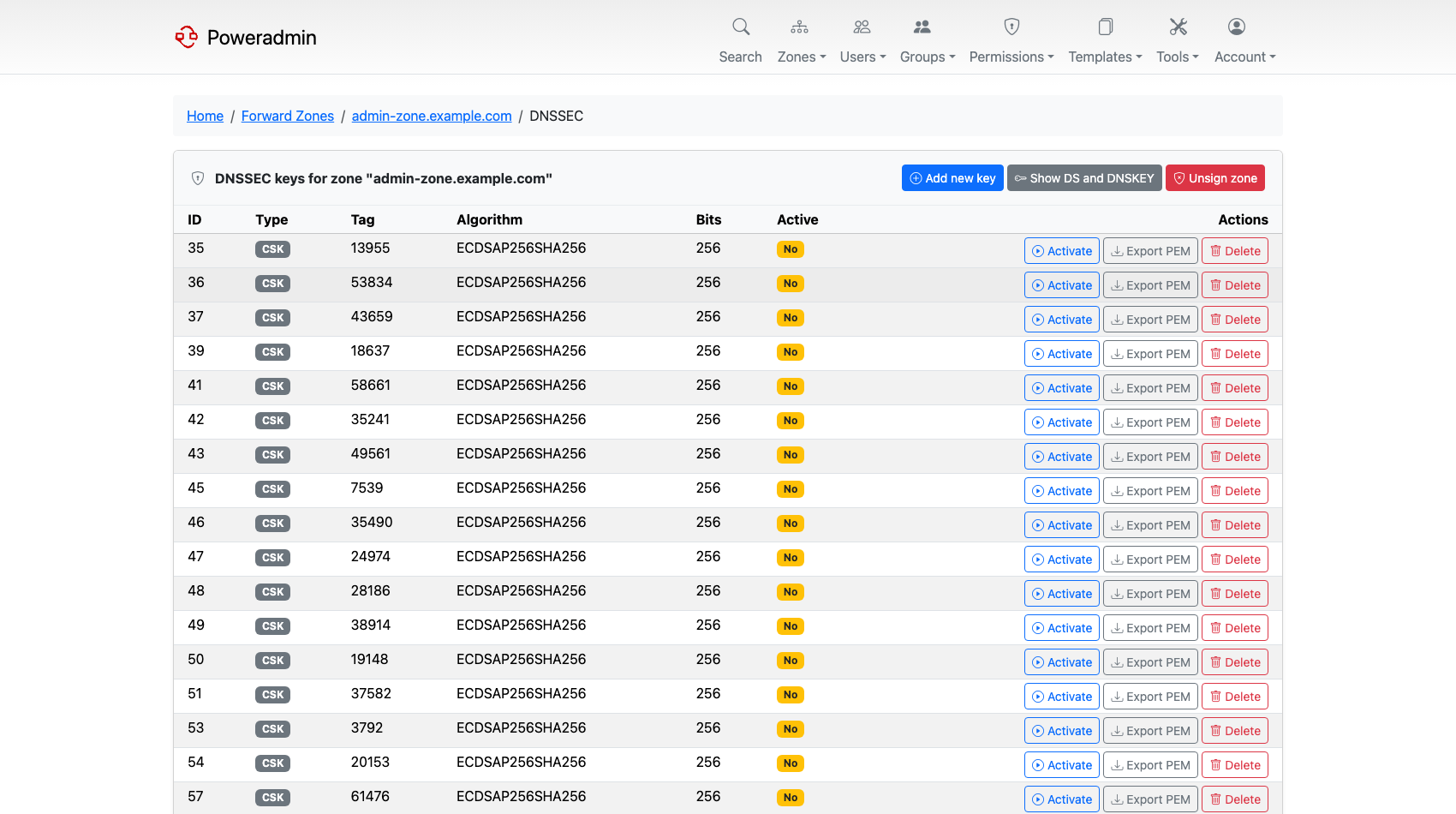
Each zone gets a key management page listing its keys with their type, tag, algorithm and active state, alongside actions to add, activate, export or delete a key, show the DS and DNSKEY records, and unsign the zone.
Basic Concepts
These are PowerDNS's own terms; see the DNSSEC introduction for the full primer.
- Zone Signing Keys (ZSK): Used to sign the actual DNS records
- Key Signing Keys (KSK): Used to sign the ZSK and establish trust
- DS Records: Delegation Signer records that help establish the trust chain
- Key Rotation: Regular update of keys for enhanced security
Prerequisites
- PowerDNS version 4.0.0 or higher
- PowerDNS with DNSSEC support
- Proper database configuration
- API access configured (see PowerDNS API Configuration)
Configuration Options
DNSSEC settings are configured in the config/settings.php file under the dnssec section.
| Setting | Default value | Description | Added in version |
|---|---|---|---|
| dnssec.enabled | false | Enable (true) or disable (false) DNSSEC support | 2.1.7 |
| dnssec.debug | false | Enable debug for DNSSEC operations | 2.1.9 |
Enabling DNSSEC
To enable DNSSEC:
- Configure your PowerDNS server with API access
-
Update your Poweradmin configuration file with the following settings:
Working through the API means:
- No need to configure special permissions for the web server user
- More secure as it doesn't require shell access
- Better error handling and feedback
- Full support for all DNSSEC operations
Warning: Leaving
pdns_api.urlorpdns_api.keyempty does not fall back to a command-line tool. Poweradmin loads a no-op DNSSEC provider instead, and every DNSSEC action silently does nothing.
PowerDNS Configuration
DNSSEC processing is enabled per backend, not by a global switch - there is no dnssec setting in
pdns.conf. Use the setting that matches your backend:
# MySQL/MariaDB backend
gmysql-dnssec=yes

# PostgreSQL backend: gpgsql-dnssec=yes
# SQLite backend:     gsqlite3-dnssec=yes

api=yes
api-key=your_api_key
See gmysql-dnssec,
gpgsql-dnssec
and gsqlite3-dnssec.
Your schema must include the DNSSEC tables (domainmetadata, cryptokeys, tsigkeys); see
Enabling the API
for the api and api-key settings.
Presigned Zones
A zone whose PRESIGNED metadata is set is signed somewhere else - typically at a primary that
transfers it in already signed - and PowerDNS serves the existing signatures rather than producing
its own. Poweradmin detects this and refuses key operations on such a zone instead of failing
halfway:
- Signing and unsigning are blocked, with "This zone is presigned; DNSSEC keys are managed at the primary server."
- Adding, editing, deleting, importing, exporting and activating keys are blocked the same way.
- The DNSSEC page still renders, so you can read the existing DS and DNSKEY records.
Manage the keys at the server that signs the zone. See PRESIGNED and Pre-signed records.
Note:
PRESIGNEDis one of the metadata kinds PowerDNS exposes read-only over the API, so Poweradmin can see it but cannot set or clear it. Usepdnsutilor the database for that.
Automatic Rectify
Signed zones must be rectified after their contents change, or the NSEC/NSEC3 chain and the
ordername values go stale and resolvers start getting bogus denial-of-existence answers.
Poweradmin calls PowerDNS's rectify endpoint for you after record writes - adding, editing and
deleting single records, batch and bulk record operations, PTR creation, and zone creation from a
template. You do not need to run pdnsutil rectify-zone by hand for changes made through
Poweradmin.
Two things to know:
- Rectify goes through the PowerDNS API, so it only happens when
pdns_api.urlandpdns_api.keyare set. Without them Poweradmin loads a no-op DNSSEC provider and rectify silently does nothing, along with every other DNSSEC action. - Changes made outside Poweradmin - direct SQL, another tool - are not rectified by Poweradmin.
Set the
API-RECTIFYmetadata on the zone so PowerDNS rectifies after its own API edits, or rectify manually.
Verification
Check DNSSEC status using:
Importing and Exporting PEM Keys
PowerDNS 4.7 and newer expose endpoints for importing PEM-encoded private keys into a zone and exporting the active ones back out. Poweradmin wires both into the zone's DNSSEC page so you can move signed zones between servers without dropping out to pdnsutil.
The buttons only appear when the connected PowerDNS reports version 4.7 or newer. On older servers (or when capability detection couldn't reach the API), they stay hidden - you can still sign and unsign zones, but not import or export key material.
Importing a Key
Open the zone's DNSSEC page and use the Import key form:
- Pick the key type - KSK, ZSK, or CSK.
- Pick the algorithm. The dropdown only shows algorithms the connected PowerDNS supports, so what you see is what will actually work. Common picks are
ecdsa256anded25519; legacy zones often usersasha256. - Paste the full PEM block, including the
-----BEGIN PRIVATE KEY-----and-----END PRIVATE KEY-----lines. - Submit.
If PowerDNS rejects the format (wrong algorithm for the key, malformed PEM, etc.) the error from the API is shown above the form. Successful imports are recorded in the zone activity log as a key-add event.
Importing requires the zone_dnssec_manage_own permission on the zone (ueberusers always pass). This is a separate permission from zone editing: full zone-edit rights without it are refused, and content-edit rights with it are accepted. The same gate applies to export.
Exporting a Key
Each key row on the DNSSEC page now has an Export action. Clicking it returns the PEM block for the active private key so you can copy it into another server or store it offline. Treat the export the same way you would treat any private key - whoever holds it can sign records for the zone.
The export is always delivered as a file download (Content-Type: application/x-pem-file), named <zone>-key-<id>.pem. The PEM is never rendered inline in the page.
Notes
- Imports and exports go through the PowerDNS API, so a working
pdns_api.urlandpdns_api.keyare required. - DS and DNSKEY records on the same page can be copied to clipboard with a single click. This is handy when handing the DS record to a registrar.
- The CSK guidance alert that used to sit on top of every DNSSEC page only appears on legacy pre-4.0 PowerDNS servers now. On 4.x+ the standard split-key advice no longer applies, and the alert was just adding noise.
- Sign and unsign actions are both recorded in the zone activity feed (sign was missing before 4.4.0).
More Information
For more details on DNSSEC and PowerDNS:
- PowerDNS DNSSEC Documentation
- PowerDNS Cryptokey API - the endpoints behind the key import/export above
- PowerDNS API Documentation