LDAP Integration
Poweradmin supports LDAP (Lightweight Directory Access Protocol) authentication, allowing you to integrate with your existing directory service such as Active Directory or OpenLDAP.
Configuration Options
LDAP settings live in config/settings.php under the ldap section. The table below also lists the flat v3.x variable each key replaced, to help when upgrading; that format was removed in 4.1.0.
| Legacy variable | Modern equivalent | Default value | Description | Added in version |
|---|---|---|---|---|
| $ldap_use | ldap.enabled | false | Enable LDAP authentication | 2.1.7 |
| $ldap_debug | ldap.debug | false | Enable debug for LDAP connection | 2.1.7 |
| $ldap_uri | ldap.uri | ldap://domaincontroller.example.com | LDAP server URI | 2.1.7 |
| $ldap_basedn | ldap.base_dn | ou=users,dc=example,dc=com | The top level of the LDAP directory tree | 2.1.7 |
| $ldap_search_filter | ldap.search_filter | no default | Filter for LDAP search | 2.1.7 |
| $ldap_binddn | ldap.bind_dn | cn=admin,dc=example,dc=com | LDAP user for binding | 2.1.7 |
| $ldap_bindpw | ldap.bind_password | some_password | Password for LDAP binding user | 2.1.7 |
| $ldap_user_attribute | ldap.user_attribute | uid | Username attribute used in LDAP search filter | 2.1.7 |
| $ldap_proto | ldap.protocol_version | 3 | LDAP protocol version | 2.1.7 |
| N/A | ldap.session_cache_timeout | 300 | Cache LDAP validation results (seconds, 0 = disabled) | 4.1.0 |
| N/A | ldap.sync_user_info | false | Sync fullname/email from LDAP on every login | 4.5.0 |
| N/A | ldap.fullname_attribute | displayName | LDAP attribute for full name (displayName for AD, cn for OpenLDAP) |
4.5.0 |
| N/A | ldap.email_attribute | LDAP attribute for email address | 4.5.0 | |
| N/A | ldap.auto_provision | false | Create missing users on first successful LDAP login | 4.5.0 |
| N/A | ldap.default_permission_template | Guest | Template for auto-provisioned users when no mapping matches | 4.5.0 |
| N/A | ldap.groups_attribute | memberOf | LDAP attribute holding group memberships | 4.5.0 |
| N/A | ldap.permission_template_mapping | [] | Maps LDAP groups to permission template names | 4.5.0 |
| N/A | ldap.allow_superuser_provisioning | false | Let LDAP mappings grant user_is_ueberuser |
4.5.0 |
| N/A | ldap.group_mapping | [] | Maps LDAP groups to Poweradmin group(s) | 4.5.0 |
Configuration Example
return [
    'ldap' => [
        'enabled' => true,
        'debug' => false,
        'uri' => 'ldap://domaincontroller.example.com',
        'base_dn' => 'ou=users,dc=example,dc=com',
        'bind_dn' => 'cn=admin,dc=example,dc=com',
        'bind_password' => 'some_password',
        'user_attribute' => 'uid',
        'protocol_version' => 3,
        'search_filter' => '(objectClass=account)',
        'session_cache_timeout' => 300,  // Cache for 5 minutes (v4.1.0+)
    ],
];
LDAP Search Filter Examples
The search filter is used to limit which LDAP accounts can authenticate to Poweradmin. Poweradmin combines it with the username lookup as (&(<user_attribute>=<login>)<search_filter>), so the filter should only contain the extra conditions - do not repeat the username clause:
// Only users that are members of the 'powerdns' group
$ldap_search_filter = '(memberOf=cn=powerdns,ou=groups,dc=poweradmin,dc=org)';

// All accounts
$ldap_search_filter = '(objectClass=account)';

// Users that are both persons and members of the 'admins' group
$ldap_search_filter = '(objectClass=person)(memberOf=cn=admins,ou=groups,dc=poweradmin,dc=org)';

// Users with 'admin' in their common name
$ldap_search_filter = '(cn=*admin*)';
Basic Setup
- Enable LDAP authentication by setting
'enabled' => truein the configuration array. - Configure your LDAP server URI and base DN.
- Set appropriate search filters based on your directory structure.
- Set binding credentials if required.
- Specify the user attribute that matches your directory structure.
Advanced Configuration
SSL/TLS Connection
For secure LDAP (LDAPS), use the following configuration:
User Attribute Mapping
Configure how Poweradmin maps LDAP attributes to user properties:
- For OpenLDAP:
'user_attribute' => 'uid' - For Active Directory:
'user_attribute' => 'sAMAccountName'
Example Directory Configurations
Active Directory
return [
    'ldap' => [
        'enabled' => true,
        'uri' => 'ldap://ad.company.com',
        'base_dn' => 'DC=company,DC=com',
        'bind_dn' => 'CN=ServiceAccount,OU=Users,DC=company,DC=com',
        'bind_password' => 'password',
        'user_attribute' => 'sAMAccountName',
        'search_filter' => '(objectClass=user)',
    ],
];
OpenLDAP
return [
    'ldap' => [
        'enabled' => true,
        'uri' => 'ldap://ldap.company.com',
        'base_dn' => 'ou=users,dc=company,dc=com',
        'bind_dn' => 'cn=admin,dc=company,dc=com',
        'bind_password' => 'password',
        'user_attribute' => 'uid',
        'search_filter' => '(objectClass=posixAccount)',
    ],
];
User Info Sync, Auto-Provisioning and Group Mapping (v4.5.0+)
Since 4.5.0, LDAP can drive user identity, permissions and group membership the same way OIDC/SAML do. All features are off by default, preserving the classic "admin pre-creates the account" workflow.
Syncing name and email
'ldap' => [
    // ...
    'sync_user_info' => true,
    'fullname_attribute' => 'displayName',  // 'cn' for OpenLDAP
    'email_attribute' => 'mail',
],
On every (non-cached) login, the user's fullname and email are refreshed from the directory. Empty attributes never blank existing values. With this enabled, the profile fields stay read-only in Poweradmin and the directory is the source of truth.
Auto-provisioning users
A user who authenticates successfully against LDAP but has no Poweradmin account gets one created automatically (with use_ldap enabled). The permission template comes from permission_template_mapping when a group matches, otherwise from default_permission_template. Provisioning fails if the username is already taken by a local (non-LDAP) account.
Mapping LDAP groups
'ldap' => [
    // ...
    'groups_attribute' => 'memberOf',
    'permission_template_mapping' => [
        'cn=dns-admins,ou=groups,dc=example,dc=com' => 'Administrator',
        'cn=dns-operators,ou=groups,dc=example,dc=com' => 'Viewer',
    ],
    'group_mapping' => [
        'cn=dns-admins,ou=groups,dc=example,dc=com' => 'Administrators',
        'cn=dns-operators,ou=groups,dc=example,dc=com' => ['Zone Managers', 'Editors'],  // 1:n mapping
    ],
],
Mapping keys must match a group value exactly. When groups_attribute returns DNs (as memberOf does), the key has to be the full DN: dns-admins does not match cn=dns-admins,ou=groups,dc=example,dc=com. Matching on the first RDN alone would discard the OU and DC that distinguish two identically named groups, so it is deliberately not supported. Semantics mirror the OIDC settings:
permission_template_mappingassigns one permission template per user; the first matching entry wins.group_mappingassigns multiple Poweradmin groups; memberships are re-evaluated (added and removed) on every login.- A template assigned via mapping is revoked back to
default_permission_templateif the user later matches no mapping; admin-assigned templates are never touched.
From 4.6.0, sign-in sync never demotes or removes the last active super admin. It skips that change and logs a warning on every login until another super admin exists. See Users and Roles.
Note:
memberOfrequires the overlay to be enabled on OpenLDAP; it is available out of the box on Active Directory. Nested group membership is not expanded.
Granting access to an Active Directory group without pre-creating users
A common request: everyone in an AD group (say PA_users) should be able to use Poweradmin, without an admin creating each account by hand. Combine auto-provisioning with a search_filter that gates login on group membership:
'ldap' => [
    'enabled' => true,
    'uri' => 'ldaps://ad.company.com',
    'base_dn' => 'DC=company,DC=com',
    'bind_dn' => 'CN=ServiceAccount,OU=Users,DC=company,DC=com',
    'bind_password' => 'password',
    'user_attribute' => 'sAMAccountName',
    // only PA_users members may log in
    'search_filter' => '(memberOf=cn=PA_users,ou=groups,dc=company,dc=com)',
    'auto_provision' => true,
    // mapping keys are the full DN as returned by memberOf, not the group name
    'permission_template_mapping' => [
        'cn=PA_users,ou=groups,dc=company,dc=com' => 'Administrator',
    ],
    'group_mapping' => [
        'cn=PA_users,ou=groups,dc=company,dc=com' => 'DNS Admins',
    ],
],
Group members are created in Poweradmin on their first login with the mapped permission template and group memberships; nobody outside PA_users can authenticate. On Active Directory, nested groups can be matched in the login filter with the matching-rule-in-chain syntax: (memberOf:1.2.840.113556.1.4.1941:=cn=PA_users,ou=groups,dc=company,dc=com) (the mapping arrays still only see direct memberOf values).
Warning: with
auto_provisionenabled and no group condition insearch_filter, any user in the directory can log in and receivesdefault_permission_template.
Security Considerations
- Always use LDAPS (LDAP over SSL/TLS) in production environments
- Implement least privilege access for binding
- Regularly rotate LDAP binding credentials
- Consider implementing connection timeout settings
- Monitor failed authentication attempts
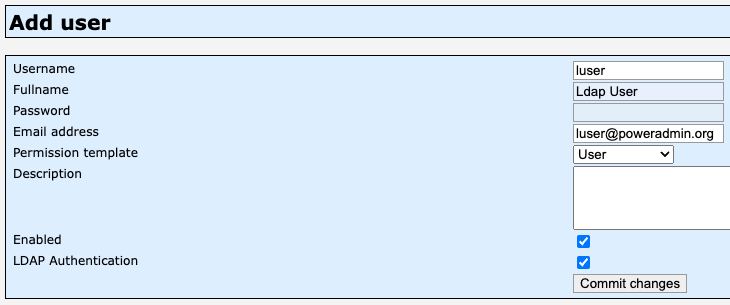
Adding Users to Poweradmin
Add a user to Poweradmin:
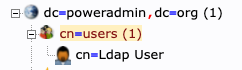
The same user should exist in the LDAP schema: