Signing a Zone with DNSSEC
How to sign a zone, hand the DS record to your registrar, and manage the keys afterwards. This is the operator's side; for the settings that make DNSSEC available in the first place, see DNSSEC Configuration.
Before you start
Three things have to be true, and if any is missing the DNSSEC actions either do not appear or do nothing:
dnssec.enabledis on inconfig/settings.php.- The PowerDNS API is reachable. All DNSSEC work goes through it -
pdns_api.urlandpdns_api.keymust both be set. With either missing, Poweradmin loads a no-op provider and every DNSSEC action silently succeeds while doing nothing. - You hold
zone_dnssec_manage_ownfor the zone. This is separate from zone editing: full edit rights without it are refused, and content-edit rights with it are accepted. Uberusers pass regardless.
The PowerDNS side also needs DNSSEC enabled for its backend (gmysql-dnssec=yes or the equivalent)
and the DNSSEC tables present in its schema.
Signing the zone
- Open the zone, then choose DNSSEC from the zone's actions.
- Choose Secure zone. PowerDNS generates a key set for you and starts signing.
That is the whole operation for a normal zone. PowerDNS defaults to a single CSK, which is the right choice for most deployments - the older advice to split KSK and ZSK does not apply on PowerDNS 4.x and newer.
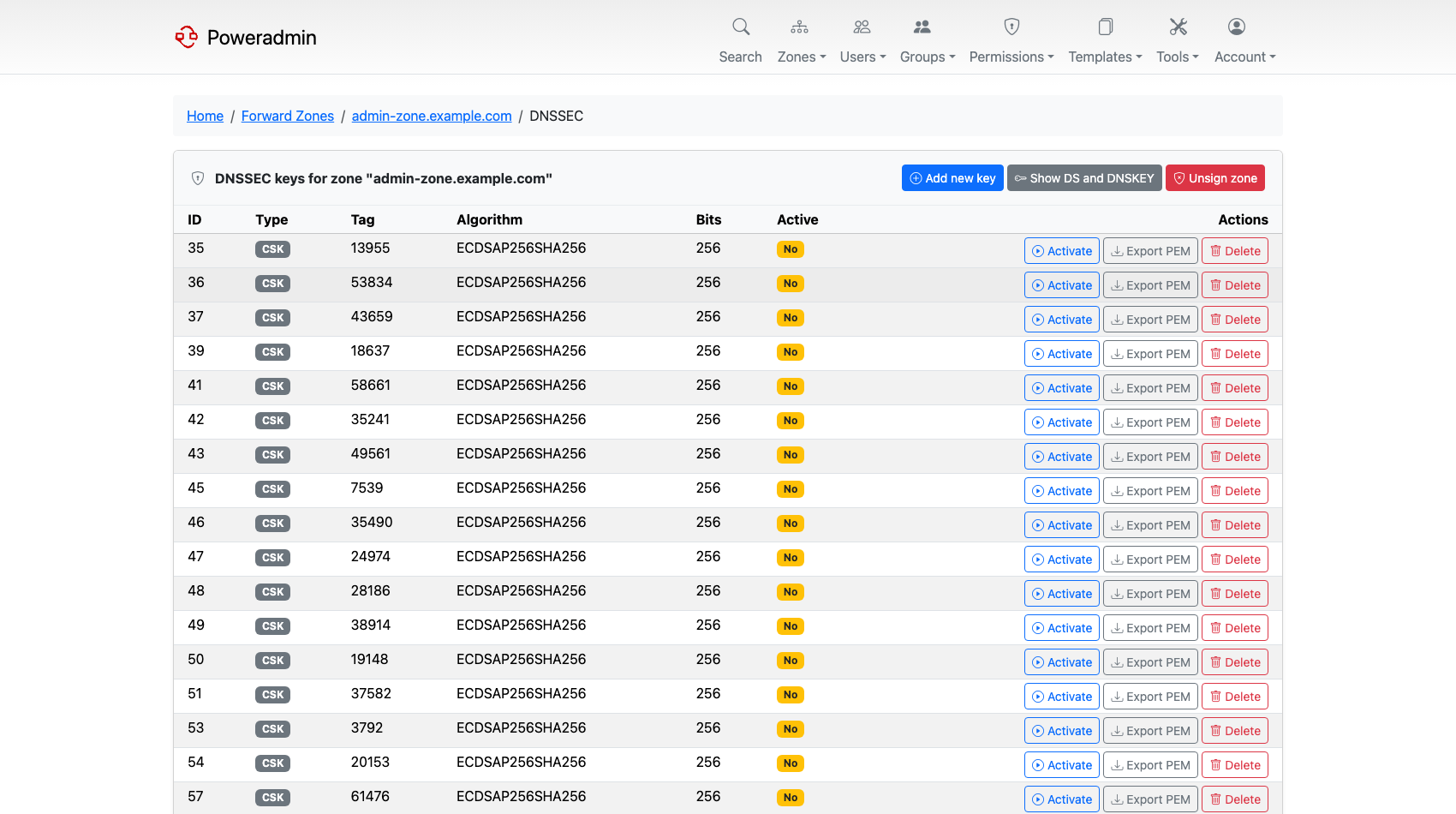
The key list shows each key's type, tag, algorithm and whether it is active, with actions to add, activate, export or delete.
Publishing the DS record
Signing alone proves nothing to the outside world. The chain of trust is only established once your parent zone - normally your registrar - publishes a DS record pointing at your key.
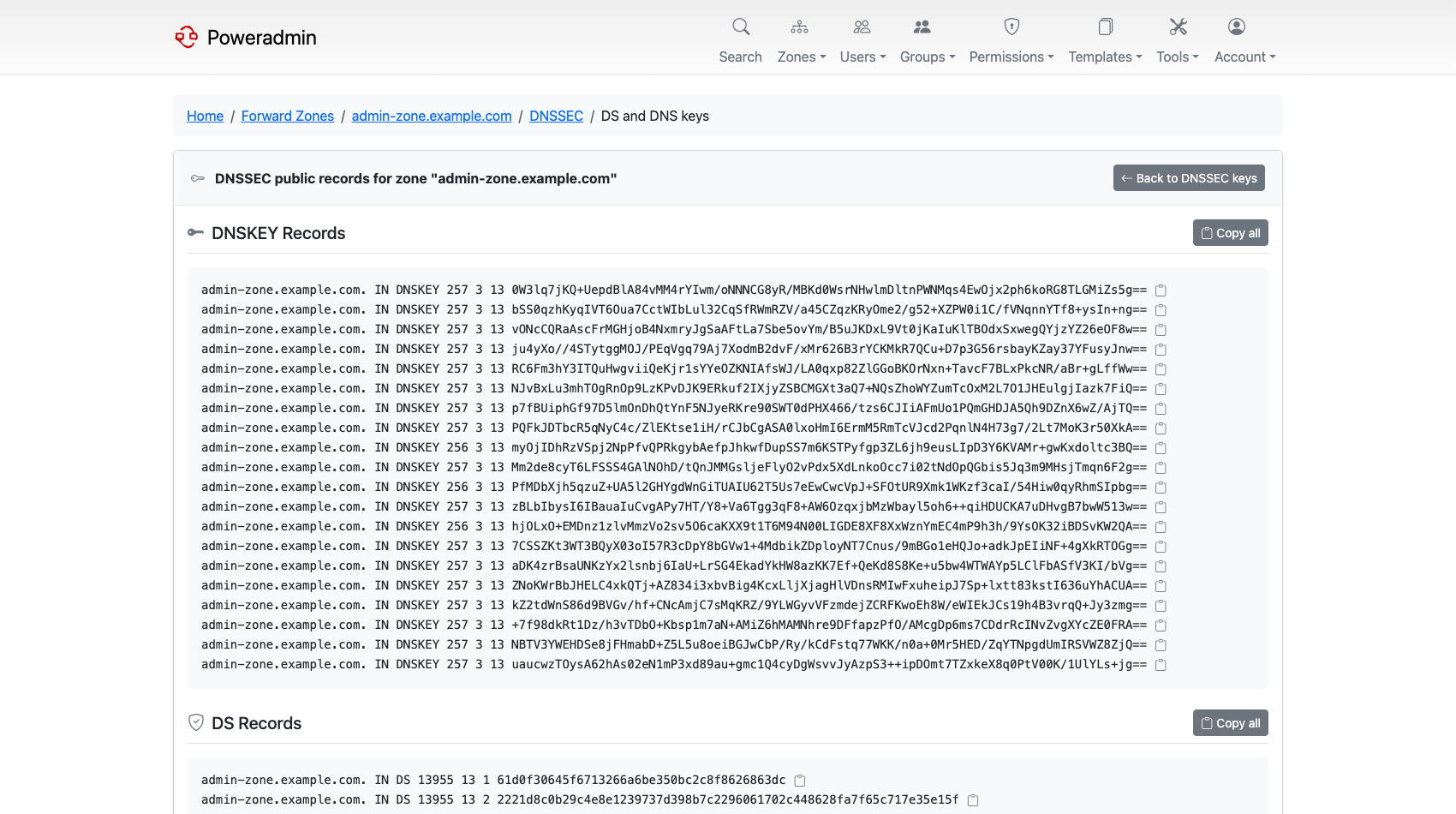
- On the DNSSEC page, open the DS and DNSKEY records view.
- Copy the DS record. There is a copy-to-clipboard button, which is worth using: a DS record mistyped by one character breaks resolution for the whole zone.
- Give it to your registrar, in whatever form they accept.
Validation starts working once the DS has propagated in the parent zone, which is not immediate. Until then the zone is signed but unvalidated, which is harmless.
Warning: Never remove a key that the published DS record refers to. Doing so makes the zone fail validation entirely - resolvers will refuse the answers rather than fall back to unsigned. Withdraw the DS at the registrar first, wait for it to expire from caches, then change keys.
Adding and rolling keys
Add key creates an extra key of a chosen type (KSK, ZSK or CSK) and algorithm. The algorithm
dropdown only lists what the connected PowerDNS actually supports, so anything shown will work;
ecdsa256 and ed25519 are the usual modern picks, with rsasha256 on older zones.
The key list shows the type PowerDNS reports, not the one you picked. PowerDNS lists a key as KSK or ZSK only while the zone has an active KSK and an active ZSK with the same algorithm; otherwise it lists the key as CSK. A KSK added on its own, or next to an inactive ZSK, therefore shows as CSK until the matching ZSK is active.
A key rollover is the same operations in a safe order: add the new key, publish the new DS alongside the old one, wait out the parent's TTL, then deactivate and remove the old key. Poweradmin gives you the individual steps - activating, deactivating and deleting keys - but does not automate the timing, so plan the waits.
Importing and exporting private keys is covered in DNSSEC Configuration; from 4.5.0 it takes BIND or PEM keys and needs PowerDNS 4.1 or newer.
Editing records on a signed zone
Nothing special to do. Poweradmin rectifies the zone after record changes, so the NSEC/NSEC3 chain
stays correct without you running pdnsutil rectify-zone. See
Automatic Rectify for exactly which operations
trigger it and what falls outside.
Presigned zones
If the zone is signed elsewhere and transferred in already signed, Poweradmin will not let you touch its keys - the actions are refused with "This zone is presigned; DNSSEC keys are managed at the primary server." You can still read the DS and DNSKEY records. Manage the keys at the server that signs the zone.
Unsigning
Unsecure zone removes the keys and stops PowerDNS signing.
Do it in the right order or you will break the zone: remove the DS record at your registrar first, wait long enough for it to expire from resolver caches, and only then unsign. A zone with a live DS in its parent but no signatures of its own fails validation, and resolvers will return SERVFAIL rather than serving it unsigned.
Checking your work
The first should return RRSIG records alongside the answer. The second shows whether the parent is publishing your DS yet.
Related Documentation
- DNSSEC Configuration - settings, PowerDNS backend flags, PEM keys
- Zone Management - the zone editor and metadata
- Permissions -
zone_dnssec_manage_own - PowerDNS DNSSEC documentation