User Preferences
Every logged-in user has a preferences page at /user/preferences, reached from the Account
menu. It overrides a subset of the site-wide interface settings for that user only - the
administrator's values in config/settings.php remain the defaults for everyone who has not
changed them.
There is no permission gate. Any user who can log in can set their own preferences, and they cannot affect anyone else's.
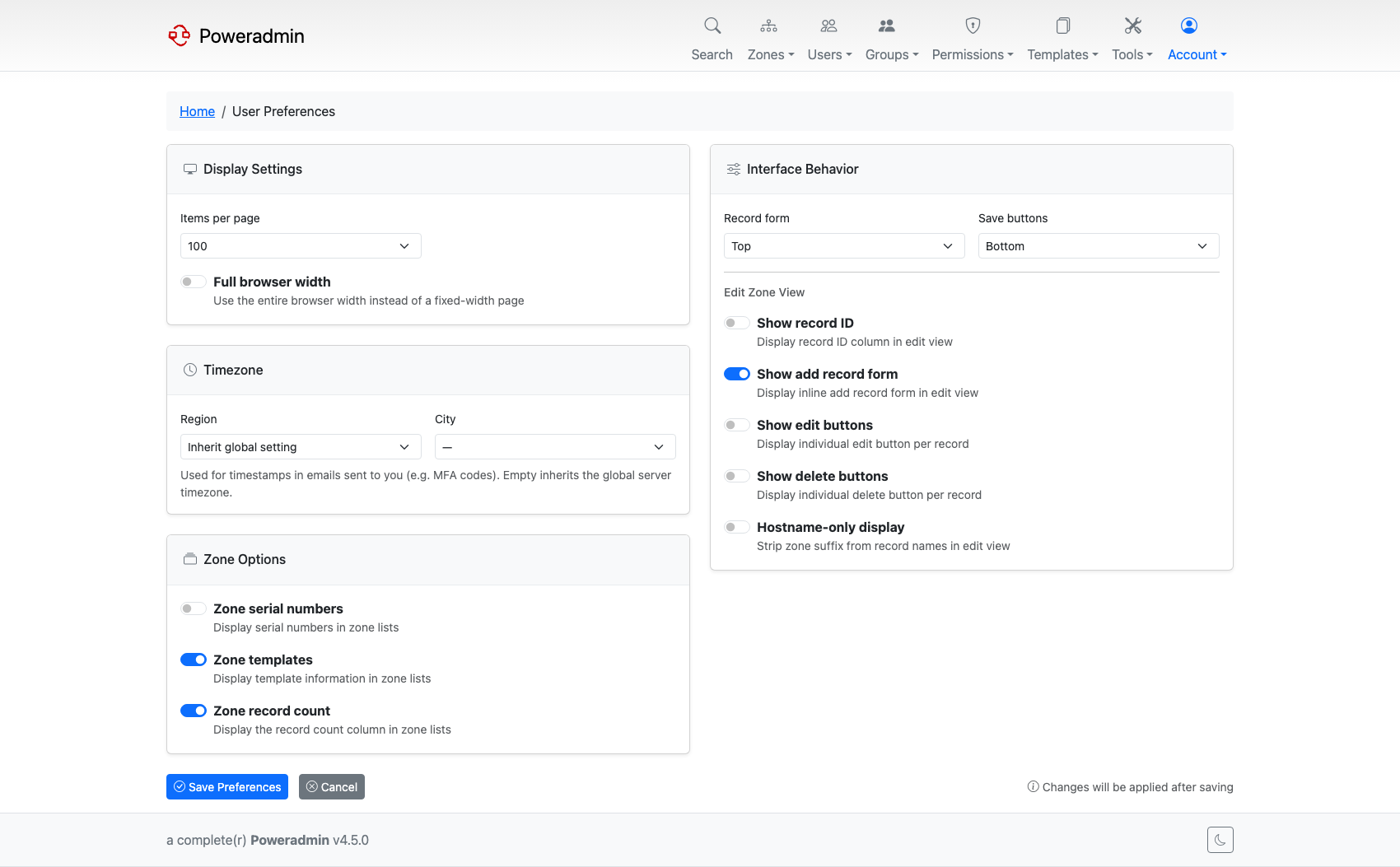
Display settings
| Preference | Overrides | Notes |
|---|---|---|
| Items per page | interface.rows_per_page |
Any value from 5 to 500. The dropdown offers 10, 20, 50 and 100 plus the configured value (4.5.0) |
| Full browser width | interface.wide_layout |
Uses the whole window instead of a fixed-width page |
Timezone
Chosen as a region and a city, giving an IANA timezone such as Europe/Vilnius. It is used for
timestamps in mail sent to you, for example MFA codes. Leaving it empty inherits the server-wide
misc.timezone.
Zone options
These three toggles control optional columns in the zone lists.
| Preference | Overrides |
|---|---|
| Zone serial numbers | interface.display_serial_in_zone_list |
| Zone templates | interface.display_template_in_zone_list |
| Zone record count | interface.show_zone_record_count |
Interface behaviour
Where the record form and the save buttons sit, and what the zone editor shows.
| Preference | Overrides |
|---|---|
| Record form position (top or bottom) | interface.position_record_form_top |
| Save buttons position (top or bottom) | interface.position_save_button_top |
| Show record ID | interface.show_record_id |
| Show add record form | interface.show_add_record_form |
| Show edit buttons | interface.show_record_edit_button |
| Show delete buttons | interface.show_record_delete_button |
| Hostname-only display | interface.display_hostname_only |
Hostname-only display strips the zone suffix from record names in the editor, so
www.example.com shows as www.
Two behaviours worth knowing:
- Show record ID is hidden in API backend mode, because PowerDNS does not expose stable numeric record IDs. Your saved value is preserved rather than cleared, so it returns if the instance moves back to the SQL backend.
- There is no theme preference. Light and dark are chosen with the toggle in the page footer,
and the site-wide default stays with
interface.theme.
Changes apply after saving.
How it is stored
Preferences are rows in the user_preferences table, one per key, unique per user. Deleting a
user removes their preferences with them. Any key a user has never set simply falls back to the
configured default, so adding a new site-wide default immediately affects everyone who has not
overridden it.
Related pages
- UI Customization Overview - the site-wide defaults these override
- Users and Roles