Supermasters and Autoprimaries
A supermaster is a primary server that Poweradmin's PowerDNS instance trusts to create zones on its own. When that server sends a NOTIFY for a zone the secondary does not have, PowerDNS provisions the slave zone automatically instead of ignoring it. This saves adding every new zone by hand on the secondary. PowerDNS documents the mechanism, including the NOTIFY-matching rules Poweradmin cannot enforce, under Autoprimary operation.
Note: PowerDNS renamed this concept to autoprimary in 4.5.0; 4.6 is when it gained an API and
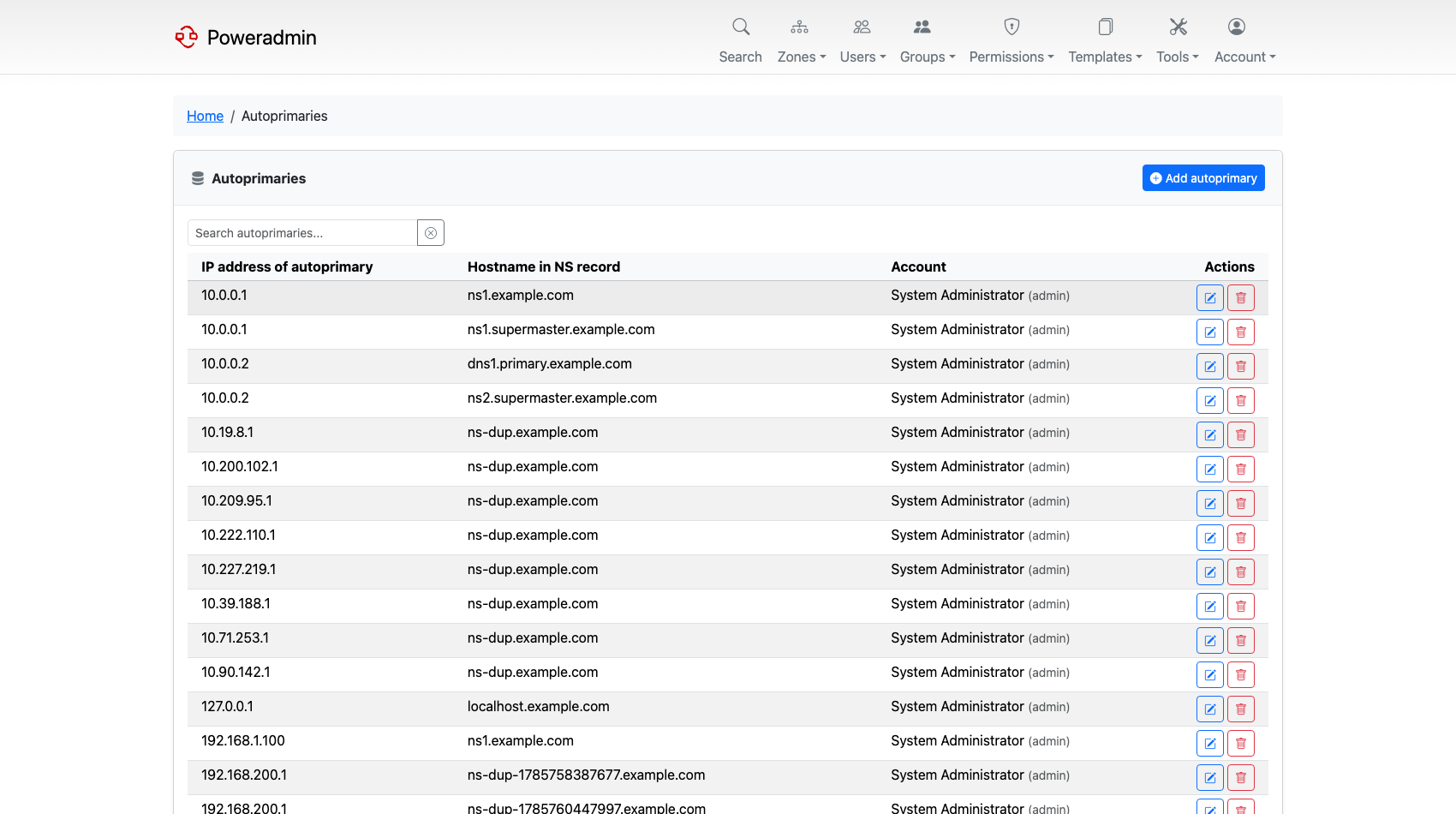
pdnsutilcommands for managing autoprimaries. Poweradmin follows the connected server: the UI says "Autoprimaries" when the server supports the autoprimary API (4.6+) and "Supermasters" when it does not. The URLs, permissions and database table keep the oldersupermastername in both cases, so this page uses whichever term matches what you will see.
Finding the page
The list lives at /supermasters. It is not in the top navigation - reach it from the cards on
the dashboard, which appear only if you hold the relevant permission.
Permissions
| Permission | Grants |
|---|---|
supermaster_view |
See the list |
supermaster_add |
Add a new entry |
supermaster_edit |
Edit and delete entries |
There is no separate delete permission - supermaster_edit covers both. See
Permissions.
Fields
Each entry has three fields, which map directly to PowerDNS's supermasters table:
| Field | Description |
|---|---|
| IP address | The address the primary sends NOTIFY from. PowerDNS matches on this exactly, so it must be the source address, not just a name that resolves to it |
| Hostname in NS record | The nameserver hostname that appears in the zone's NS records |
| Account | A Poweradmin username. Zones auto-created from this supermaster are assigned to that user |
The IP address and hostname together form the primary key, so the same IP can appear more than once with different nameserver hostnames. Editing and deleting identify an entry by both values.
Setting Account matters in practice: without it, auto-created zones arrive with no owner and are invisible to non-administrator users. Those show up under "zones without owners" in the Database Consistency Check.
Adding an entry
-
Open the supermasters list and choose Add autoprimary (or Add supermaster).
-
Enter the IP address, the nameserver hostname, and the account that should own zones created from it.
-
Save. The entry takes effect immediately - PowerDNS consults the table when a NOTIFY arrives.
For the secondary to actually build the zone, the primary must also allow it to transfer, and the NOTIFY must come from the address you entered.
Adding, editing and deleting are all written to the activity log; see Database Logging.
Related pages
- Zone Management - creating slave zones by hand
- Secondary Zone Import - pulling an existing zone over AXFR
- PowerDNS API Configuration - the status page reports whether each configured autoprimary is reachable