Change Requests
Available since v4.6.0.
The change approval workflow puts a review step between a user and the zone. A user who may only request changes edits the zone as usual, but the save is stored as a change request instead of being written. A reviewer opens the request, sees the before and after of every row, and approves or rejects it. Approval applies the stored changes to the zone.
The workflow is off by default. With it off, nothing changes: the permissions below grant nothing, the request pages answer 404, and no request table is read.
Turn it on when zone edits need a second pair of eyes, for example when a support team prepares changes that an operator signs off, or when every change to production zones must be reviewed before it goes live.
Turning it on
| Setting | Default | Description |
|---|---|---|
approval.enabled |
false |
Route the zone changes of request-only users through review |
approval.require_review_for_all |
false |
Every zone change becomes a change request, even for editors and administrators |
approval.allow_self_approval |
true |
Whether the requester may approve their own request; false needs a second reviewer (v4.6.0+) |
Docker deployments set PA_APPROVAL_ENABLED, PA_APPROVAL_REQUIRE_REVIEW_FOR_ALL and PA_APPROVAL_ALLOW_SELF_APPROVAL.
Email notifications are a separate toggle, see Notifications.
The 4.6.0 update script creates the zone_change_requests table and registers the four
permissions. Run it before enabling the workflow - see
Upgrading to 4.6.0.
Permissions
Four permissions were added. None of them is granted to any permission template automatically; grant them in the template editor.
| Permission | Description |
|---|---|
zone_change_request_own |
Request changes to zones the user owns |
zone_change_request_others |
Request changes to any zone |
zone_change_approve_own |
Review change requests for zones the user owns |
zone_change_approve_others |
Review change requests for any zone |
Ownership follows the usual rule: a zone counts as owned when the user owns it directly or through a group.
How the levels combine with editing
Whether a user's save is written directly or filed as a request depends on the edit permission and the request permission together:
| The user can edit the zone | The user can request changes to the zone | require_review_for_all off |
require_review_for_all on |
|---|---|---|---|
| yes | any | written directly | filed as a request |
| no | yes | filed as a request | filed as a request |
| no | no | refused | refused |
So a request permission matters only for zones the user cannot edit. A user who holds
zone_content_edit_own and zone_change_request_others edits their own zones directly and
files requests for everyone else's.
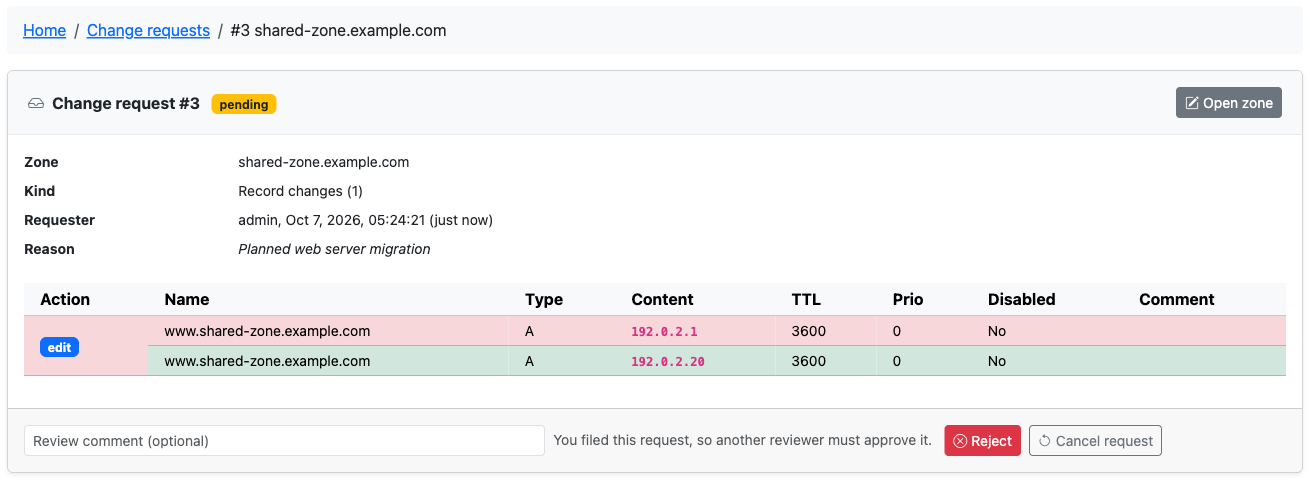
require_review_for_all turns every save into a request, for editors and administrators
too. By default the reviewer may be the requester, so an administrator who files a request
under this mode can approve it right away. Set approval.allow_self_approval to false for a
four-eyes rule: the requester can then still reject or cancel their request, but approving it
(or retrying a failed one) needs another reviewer, through the web page and the API alike
(403 "You cannot approve your own change request."). The request list marks requests that
nobody but the requester could approve with No reviewer other than the requester.
Request-only users still need zone_content_view_own or zone_content_view_others to open
the zone at all.
Who reviews
Reviewing needs the approve permission and the edit permission for the zone.
Approval replays the stored changes as the reviewer, and the record writer checks the
reviewer's edit rights on every write, so the approve permission adds to edit rights and
never replaces them. A user with zone_change_approve_others but no edit permission sees
nothing to review.
Administrators (user_is_ueberuser) review every request without holding either
permission.
Approving a zone deletion request additionally needs zone_delete_own or
zone_delete_others, the same right a direct deletion needs. Without it the request ends
in the failed state.
Requesting a change
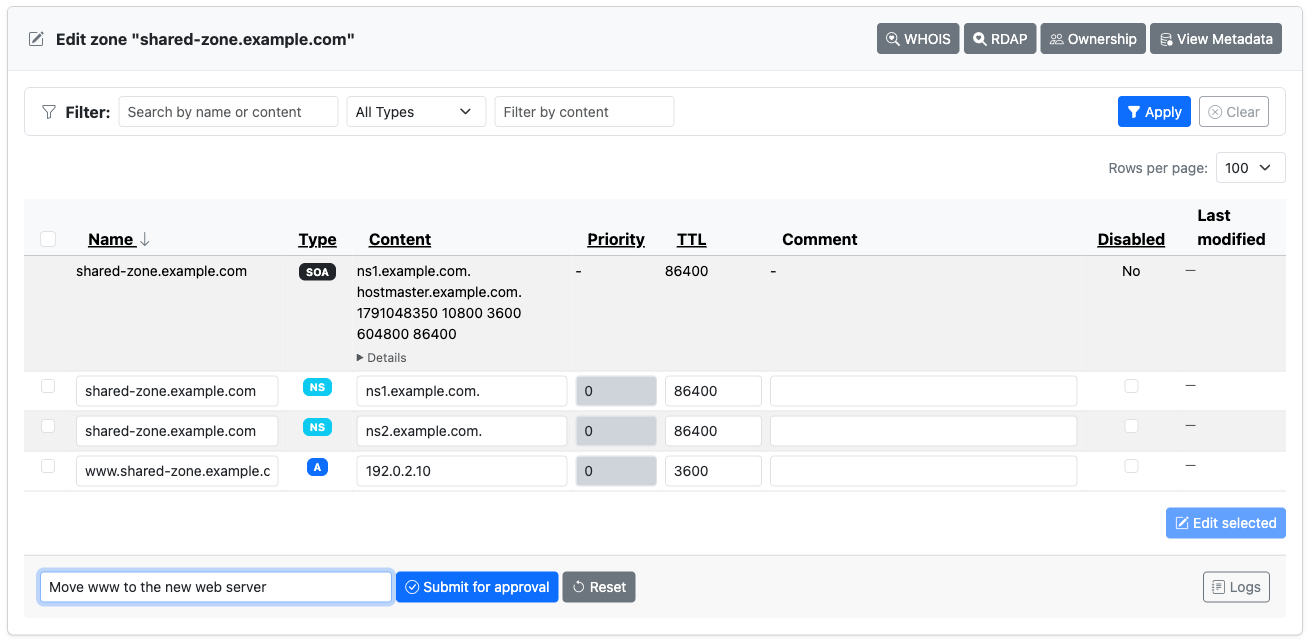
A requester gets the normal zone editor. The difference is what the save button does.
- Save changes and Add record read Submit for approval.
- A Reason for this change field sits next to the button. It is optional unless
logging.require_change_commentis on, in which case a request without a reason is refused, the same as a bulk edit without one. Reasons are capped at 200 characters in the form. - Saving the record table files every row that differs from what the zone holds, plus the zone comment when it changed, as one request. A save that changes nothing files nothing and says so.
- The inline add form files one request per record. A record that already exists in the zone is refused before anything is filed.
- The single record edit page and the delete confirmation page file requests the same way.
Rows are validated when the request is filed, with the same rules as a direct save, so a reviewer never sees a request the zone would refuse.
Every request is stored with the zone serial at the time the form was rendered. The review page uses it to warn when the zone moved on.
What requesters cannot do
The first version routes single record edits, adds, deletes and zone deletion through
review. Everything that writes many records at once stays direct-only and is hidden from a
requester on the edit page: Bulk add, Multi-record mode, Delete record(s) for a
selection, the DNS wizards, zone Import, PTR generation, and applying a zone template.
Opening any of these pages by URL, or editing the zone comment on its own page, is refused
with "This zone requires approval for changes; use the zone editor to submit a change
request." The same refusal applies to editors under require_review_for_all, so the only
way to change a reviewed zone is a change request.
Zone creation is not reviewed. A user who may add zones still adds them directly, with
require_review_for_all on or off.
Records in Secondary and Consumer zones replicate from a primary and cannot be requested either.
Requesting a zone deletion
The delete confirmation page of a zone turns into a request form when the user holds a
request permission for the zone but not the delete permission, or when
require_review_for_all is on. The button reads Request deletion, the page carries the
same reason field, and the zone stays until a reviewer approves. Approving deletes the whole
zone with all of its records.
Before the zone is deleted, a copy of it is stored with the request as a BIND zone file.
The review page of the approved request offers Download zone file taken before
deletion, and the API returns it in the snapshot field of the request. Re-import it
through the zone import tool to bring the zone back. Disabled records are kept in the copy
as ; poweradmin-disabled: lines, which other DNS tools read as comments, and the import
restores them as disabled records; when those lines would push the file past the size
limit below, the copy leaves the disabled records out. The copy is visible to the requester,
to reviewers and to users who may view the zone, and is skipped when it exceeds 60000
bytes.
Deleting several zones at once from the zone list stays direct-only.
Following your own requests
The edit page shows a Pending change requests card to everyone who can edit or request changes to the zone, with the requester, age, number of changes and reason of each open request. A requester can open a request from there and Cancel request while it is still pending. Cancelling is limited to the person who filed it.
The Change requests page under the Zones menu lists your own requests when you hold a request permission but no review scope, with a status filter.
The zone lists show a count next to each zone that has pending requests you may list, linking to the requests page filtered to that zone.

Reviewing
The Change requests entry appears in the Zones menu for everyone who holds one of
the four permissions, and for administrators. The entry carries a badge with the number of
pending requests in the reviewer's scope: every zone with zone_change_approve_others or
user_is_ueberuser, the owned zones with zone_change_approve_own.
The list page is at /zones/requests. It defaults to pending requests and can be filtered
by status (pending, approved, rejected, cancelled, failed or all) and by zone id.
Each row shows the zone, kind (records or zone deletion), requester, number of changes and
filing time, with a Review link for requests in your scope and a View link for your
own.
The review page
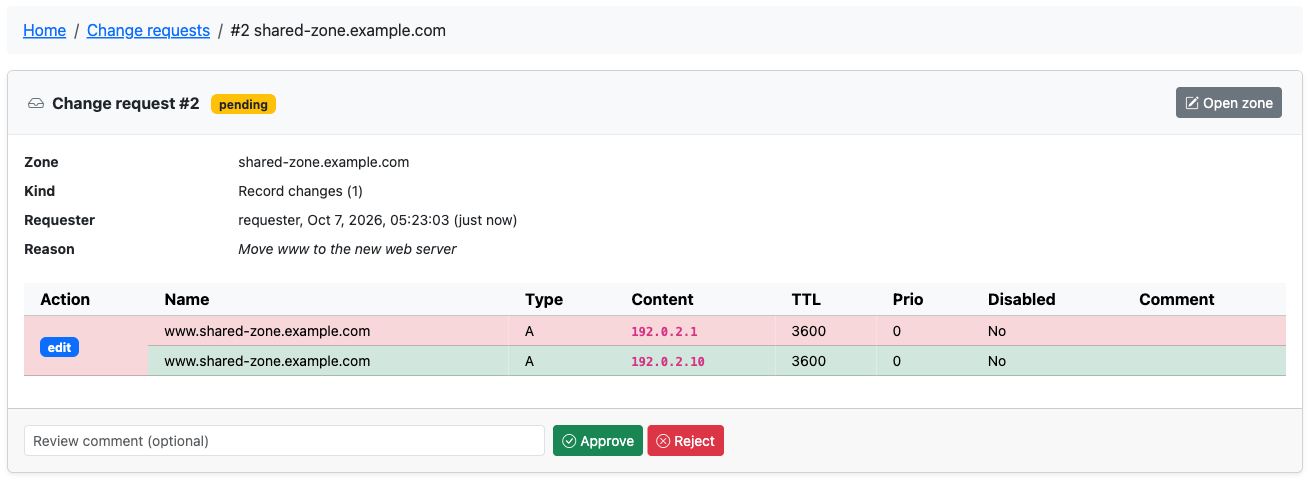
/zones/requests/{id} shows the request header - zone, kind, requester, reason, filing
time, and the serial the form was rendered at - followed by the actions. An edit shows the
stored row above the requested row with the changed fields in bold, an addition shows the
new row, a deletion shows the row that goes away. A changed zone comment is listed after
the rows.
Two warnings can appear on a pending request:
- Stale changes. A row is marked stale when the zone no longer holds the "before" state the request was filed against: the record was edited or deleted in the meantime, or a requested addition already exists. The page says so and still lets you approve. Approving a stale edit overwrites the current row with the requested one; approving a deletion of a record that is already gone succeeds without doing anything. An edit of a record that no longer exists, or an addition the zone already holds, fails when applied and puts the request in the failed state.
- Serial moved. The zone serial differs from the one recorded at filing. This means something changed in the zone since, not necessarily the rows in the request.
Approve and Reject take an optional review comment. Approving applies the actions in order and bumps the serial once. Rejecting touches nothing. Both are final: a decided request cannot be reopened, and a second decision on the same request is refused with "This change request has already been decided."
The page is visible to reviewers of the zone, to the requester, and to anyone who may view the zone's records.
The failed state
A request whose approval could not be applied ends in failed rather than approved. The error is shown on the review page. This happens when the write is refused, for example when the reviewer lacks the right to write a particular record type, when the reviewer may not delete the zone, or when the backend reports an error.
On the SQL backend the actions of a records request are applied in one transaction, so a failure leaves the zone untouched and the error says "Nothing was applied." On the PowerDNS API backend the actions land one at a time, and the error names the actions that had already been applied before the failure.
Once the cause is fixed, a reviewer opens the failed request and presses Try again, which applies it once more. Actions that already landed in full are skipped: an addition whose record exists with the requested name, type, content, TTL, priority and disabled flag, an edit whose record already holds the requested state, and a deletion whose record is gone. The API does the same through the approve endpoint. Rejecting or cancelling a failed request is not possible.
Notifications
Mail is off by default and needs both switches:
return [
    'mail' => [
        'enabled' => true,
        // transport settings, see Mail Configuration
    ],
    'notifications' => [
        'change_request_enabled' => true,
    ],
];
In Docker the toggle is PA_NOTIFICATION_CHANGE_REQUEST. With
notifications.change_request_enabled on and mail.enabled off, nothing is sent and a
warning is logged.
| Event | Recipients | Subject |
|---|---|---|
| Request filed | Every active user who may review the zone (approve level plus edit permission, administrators included) and has an email address. The requester is skipped. With notifications.change_request_soa_contact on, the mailbox from the zone's SOA record as well |
Change Request #N Filed: example.com |
| Request approved, rejected or failed | The requester, when they have an email address | Change Request #N Approved: example.com (or Rejected, Failed) |
A cancelled request sends no mail. The filed message carries the requester's address as
Reply-To, so a reviewer can answer them directly. The messages link to the review page, so
set interface.application_url for the link to be right.
The SOA contact is derived from the RNAME field of the SOA record: the first label becomes
the mailbox, an escaped dot in it stays a dot, and the rest becomes the domain, so
hostmaster.example.com. is mailed as hostmaster@example.com. It is off by default
(PA_NOTIFICATION_CHANGE_REQUEST_SOA_CONTACT in Docker) because that mailbox may belong to
someone outside the installation. A mail failure never undoes the
request or the decision; it is logged and the workflow continues.
Templates are templates/emails/change-request-filed.*.twig and
change-request-decided.*.twig; see Mail Configuration.
Audit trail
With logging.database_enabled on, every step is written to the zone activity log
(log_zones) as an operation on the zone, with the request id and the comment:
| Operation | Written when | Acting user |
|---|---|---|
change_request_filed |
A request is stored | The requester |
change_request_approved |
A reviewer approves and the changes were applied | The reviewer |
change_request_rejected |
A reviewer rejects | The reviewer |
change_request_failed |
Approval was given but applying failed | The reviewer |
change_request_cancelled |
The requester withdraws the request | The requester |
The applied records also appear in the Record Change Log. The
reviewer is the user who wrote, so the rows are attributed to the reviewer, and the
changeset reason names the origin: Change request #12 from operator, followed by the
request reason when one was given (or the review comment when there was no request reason).
Filter the change log by reason to find everything that came in through review.
API v2
The endpoints answer 404 with "Change approval is not enabled" while approval.enabled is
off. They need an API key with the usual X-API-Key header; the decision endpoints need a
key allowed to perform update operations, and approving additionally needs the key to be
allowed to perform the operations the request contains (create for additions, delete for
deletions and zone deletion, update otherwise) on that zone.
| Method | Path | Purpose |
|---|---|---|
POST |
/api/v2/zones/{id}/change-requests |
File a request for a zone |
GET |
/api/v2/change-requests |
List requests in your review scope plus your own |
GET |
/api/v2/change-requests/{id} |
One request with stale_actions and base_serial_mismatch |
POST |
/api/v2/change-requests/{id}/approve |
Approve and apply |
POST |
/api/v2/change-requests/{id}/reject |
Reject |
DELETE |
/api/v2/change-requests/{id} |
Cancel your own pending request |
Filing a request
The body carries an actions list and an optional comment. An action is one of add,
edit, delete or zone_delete. add and edit carry a record object (name, type,
content, ttl, priority, disabled, comment); edit and delete carry a
record_id. For an edit, omitted fields keep their stored value.
curl -X POST https://dns.example.com/api/v2/zones/3/change-requests \
  -H "X-API-Key: your-api-key" \
  -H "Content-Type: application/json" \
  -d '{
    "comment": "New web server",
    "actions": [
      {"op": "add", "record": {"name": "www", "type": "A", "content": "192.0.2.1", "ttl": 3600}}
    ]
  }'
{
  "success": true,
  "message": "Change request filed for review.",
  "data": {
    "change_request": {
      "id": 12,
      "zone_id": 3,
      "zone_name": "example.com",
      "kind": "records",
      "status": "pending",
      "requester": {"id": 7, "username": "operator"},
      "request_comment": "New web server",
      "base_serial": null,
      "actions": [
        {"op": "add", "after": {"name": "www.example.com", "type": "A", "content": "192.0.2.1", "ttl": 3600, "prio": 0, "disabled": 0, "comment": ""}}
      ],
      "zone_comment": null,
      "reviewer": null,
      "review_comment": null,
      "created_at": "2026-09-20 10:00:00",
      "reviewed_at": null,
      "applied_at": null,
      "error": null
    },
    "change_requests": [ ... ]
  }
}
Filing is allowed when the caller may edit the zone or holds a request permission that
covers it. Each add and delete action becomes its own request; all edit actions in one
call are filed together as one request. data.change_requests lists everything the call
filed, data.change_request is the first of them. A zone_delete action must be the only
action in the call and needs a request permission for the zone, or the delete permission
under require_review_for_all.
Every action is checked before the first one is filed. When a row fails validation the
answer is 400 with the validator's message; a record that already exists answers 409;
a request too large to store answers 413. SOA, NS and LUA records follow the same
record-type rule as direct edits.
Listing
status defaults to pending; pass approved, rejected, cancelled, failed or
all. zone_id narrows to one zone. per_page and page paginate; without per_page the
call returns up to 10000 matches, newest first, and adds a pagination block only when more
match, so you can fetch the rest with per_page and page.
curl "https://dns.example.com/api/v2/change-requests?status=pending&per_page=25" \
  -H "X-API-Key: your-api-key"
The list covers the zones the caller may review plus the requests the caller filed. A key restricted to certain zones sees only those.
Approving
curl -X POST https://dns.example.com/api/v2/change-requests/12/approve \
  -H "X-API-Key: your-api-key" \
  -H "Content-Type: application/json" \
  -d '{"comment": "Looks good"}'
{
  "success": true,
  "message": "Change request approved and applied.",
  "data": {"change_request": {"id": 12, "status": "approved", "...": "..."}}
}
A refused or failed write answers with the failure and leaves the request in failed; the
returned change_request carries the reason in error. reject takes the same optional
comment. Both answer 409 with "This change request has already been decided." on a
request that is no longer pending, and 403 with "You do not have permission to review
change requests for this zone" when the caller may not review it.
Direct writes that need review
When the caller's changes to a zone are routed through review, the record write endpoints refuse instead of writing:
{
  "success": false,
  "message": "Changes to this zone require approval; create a change request instead"
}
The status is 403. This applies to POST, PUT and DELETE on
/api/v2/zones/{id}/records, /api/v2/zones/{id}/records/bulk, the RRset endpoints, the
dynamic DNS endpoint, and to DELETE /api/v2/zones/{id} under require_review_for_all.
A client that gets this answer files a change request instead.
Dynamic DNS
A dynamic DNS client cannot file a change request, so an update from a user whose changes
to the zone need review is refused. The API endpoint answers 403 with the message above.
The dynamic_update.php script speaks the dyndns2 text protocol, which has no status for
this case, so it answers !yours. Give DDNS accounts an edit permission for their zone, or
keep require_review_for_all off for installations that rely on DDNS.
Limitations of this version
- Bulk add, multi-record mode, deleting a selection of records, applying a zone template, the DNS wizards, zone import, PTR generation and the zone comment page cannot file a request; they are refused for a reviewed zone.
- A request carries the record itself only: the "Add PTR", "Add A/AAAA" and "Update PTR" companion options are not offered in request mode. File the reverse record separately.
- Zone creation is not reviewed.
- Deleting several zones at once from the zone list is not reviewed and keeps no snapshot.
- Self-approval is allowed unless
approval.allow_self_approvalisfalse. - Stale requests warn but can still be approved.
- Requests are kept indefinitely. Prune the
zone_change_requeststable on your own schedule.
Related pages
- Permissions - the four permissions in the permission reference
- Record Change Log - where approved changes are logged
- Mail Configuration - the transport notifications need
- API Endpoints - the full endpoint map