Web Server Authentication (REMOTE_USER)
Poweradmin can sign users in as the user your web server or an authenticating reverse proxy has already verified. Added in 4.6.0.
Overview
When remote_user.enabled is on, Poweradmin reads the user name from the web server (the REMOTE_USER server variable) or from a header set by a trusted proxy. It then starts a session for that user. Nobody types a password into Poweradmin.
Key features:
- Works with any front end that sets
REMOTE_USER: Apache basic auth,mod_auth_mellon,mod_auth_gssapi, nginxauth_basic - Header mode for proxies such as Authelia and oauth2-proxy, accepted only from addresses you list
- Optional email, full name and group attributes from the same source
- Automatic account creation, with group mapping to permission templates and groups as for SAML
- Per-account opt-in: only accounts set to "web server" sign-in are signed in this way
- Works with MFA, idle timeout and the disabled-account check
Requirements and Security
Poweradmin believes whatever the web server tells it. Anyone who can reach PHP without going through the authenticating server can be any user.
- Enable the feature only when PHP cannot be reached except through the authenticating server or proxy. Do not publish the PHP-FPM port or the container port directly.
- The server variable must be set by the web server itself. Names starting with
HTTP_orPHP_AUTH_(and Apache'sREDIRECT_copies of them) are refused, because a client can set them. - A proxy header is believed only when the request comes from an address in
remote_user.trusted_proxies. The list is explicit and nothing is trusted implicitly. Addresses are compared as PHP sees them, so::ffff:10.0.0.5does not match10.0.0.5. - The proxy must overwrite the header on every request, not append to it.
- Exclude
/api/v2from the web server's authentication. API v2 uses API keys (or Basic auth) as before and is not affected by this feature. /api/internalmust stay protected like the rest of the web interface.
nginx
nginx fills $remote_user from any client's Authorization header, whether or not the password was checked. Pass REMOTE_USER to PHP only in locations protected by auth_basic.
This pattern comes from the Poweradmin devcontainer. auth_basic covers the whole site and hands the checked user to PHP. /api/v2/ is exempted in a prefix location, which nginx matches on the normalised path, so /api/v2/../index.php cannot slip past auth_basic. Do not key the exemption on $request_uri, which is not normalised.
server {
    auth_basic "Poweradmin";
    auth_basic_user_file /etc/nginx/htpasswd;

    # API v2 uses its own keys; the user is blanked where auth_basic is off
    location ^~ /api/v2/ {
        auth_basic off;
        fastcgi_pass unix:/run/php/php-fpm.sock;
        include fastcgi_params;
        fastcgi_param SCRIPT_FILENAME $document_root/index.php;
        fastcgi_param SCRIPT_NAME /index.php;
        fastcgi_param REMOTE_USER "";
    }

    location / {
        try_files $uri $uri/ /index.php$is_args$args;
    }

    location ~ \.php$ {
        fastcgi_pass unix:/run/php/php-fpm.sock;
        include fastcgi_params;
        fastcgi_param SCRIPT_FILENAME $document_root$fastcgi_script_name;
        fastcgi_param REMOTE_USER $remote_user;
    }
}
With auth_request (oauth2-proxy, Authelia) use header mode instead.
Apache
Require valid-user, mod_auth_mellon and mod_auth_gssapi set REMOTE_USER natively. No extra step is needed.
Settings
Settings live in config/settings.php under the remote_user section.
| Setting | Default | Description |
|---|---|---|
remote_user.enabled |
false | Sign users in from the web server's authenticated user |
remote_user.server_variable |
"REMOTE_USER" | Server variable holding the user name. HTTP_* and PHP_AUTH_* names are refused |
remote_user.header |
"" | Read the user from this proxy header instead (for example Remote-User). Empty means use server_variable |
remote_user.trusted_proxies |
[] | Proxy IPs or CIDRs allowed to send header. Empty means the header is ignored |
remote_user.strip_realm |
false | Turn user@REALM and DOMAIN\user into user. Use with a single realm only: alice@A and alice@B become the same account |
remote_user.email_attribute |
"" | Variable (or header, in header mode) holding the email address, for example Remote-Email |
remote_user.name_attribute |
"" | Variable (or header) holding the full name, for example Remote-Name |
remote_user.groups_attribute |
"" | Variable (or header) holding the groups, for example Remote-Groups |
remote_user.groups_separator |
"," | Separator between groups in groups_attribute |
remote_user.logout_url |
"" | Where to send users after logout, to end the web server's own session. Empty means the Poweradmin login page. Must be an http or https URL |
remote_user.hide_login_form |
false | Hide the password form while the web server signs someone in |
remote_user.auto_provision |
true | Create an account on first sign-in |
remote_user.allow_superuser_provisioning |
false | Let mappings grant user_is_ueberuser |
remote_user.sync_user_info |
true | Update name and email from the attributes on each sign-in |
remote_user.default_permission_template |
"Guest" | Permission template for new accounts (no permissions until an admin assigns a role) |
remote_user.permission_template_mapping |
[] | Group to permission template name, as for saml |
remote_user.group_mapping |
[] | Group to Poweradmin group name, or a list of names, as for saml |
Names read from the source are limited to 64 characters and may not contain whitespace or control characters. Such a name is ignored and logged.
How Accounts Are Matched
Poweradmin looks up the account by user name. Only accounts whose sign-in method is web server are signed in this way.
- A local (SQL), LDAP, OIDC or SAML account with the same name is refused. It is never taken over.
- Email is not used to link accounts.
- With
auto_provisionon, an unknown user gets a new account withdefault_permission_template(Guest by default), or the templates and groups picked by the mappings. - With
auto_provisionoff, the user must already have an account set to web server sign-in. - Superuser rights are never granted from the web server unless
allow_superuser_provisioningistrue. Otherwise an administrator grants them in Poweradmin. See Superuser rights are never provisioned from an identity provider for the reasoning.
Groups from groups_attribute feed permission_template_mapping and group_mapping the same way as for SAML.
Converting existing accounts
An administrator can switch an account to web server sign-in:
- Open the account on the Add user or Edit user page.
- Tick Web server authentication. The checkbox appears only when
remote_user.enabledis on. - Save.
Changing another account's sign-in method needs the right to change other users' passwords (user_passwd_edit_others), because it hands the account to whoever holds that name on the web server. The same now applies to the LDAP box. Turning it on disables the account's local password. Turning it off again requires setting a new password. The box cannot be combined with the LDAP box, and it is hidden on a superuser's own profile, as the LDAP box is. The users list shows a Web server badge for these accounts.
Sessions
- The session starts automatically on the first page. There is no login step.
- It ends when the web server stops sending the user. When it sends a different user, that user's own session replaces it.
- The idle timeout is renewed while the web server still sends the same user.
- A disabled account is refused, and its open session ends.
- Users with MFA enabled verify the second factor after sign-in.
security.mfa.skip_for_external_authapplies as it does for LDAP and SSO.
Login page
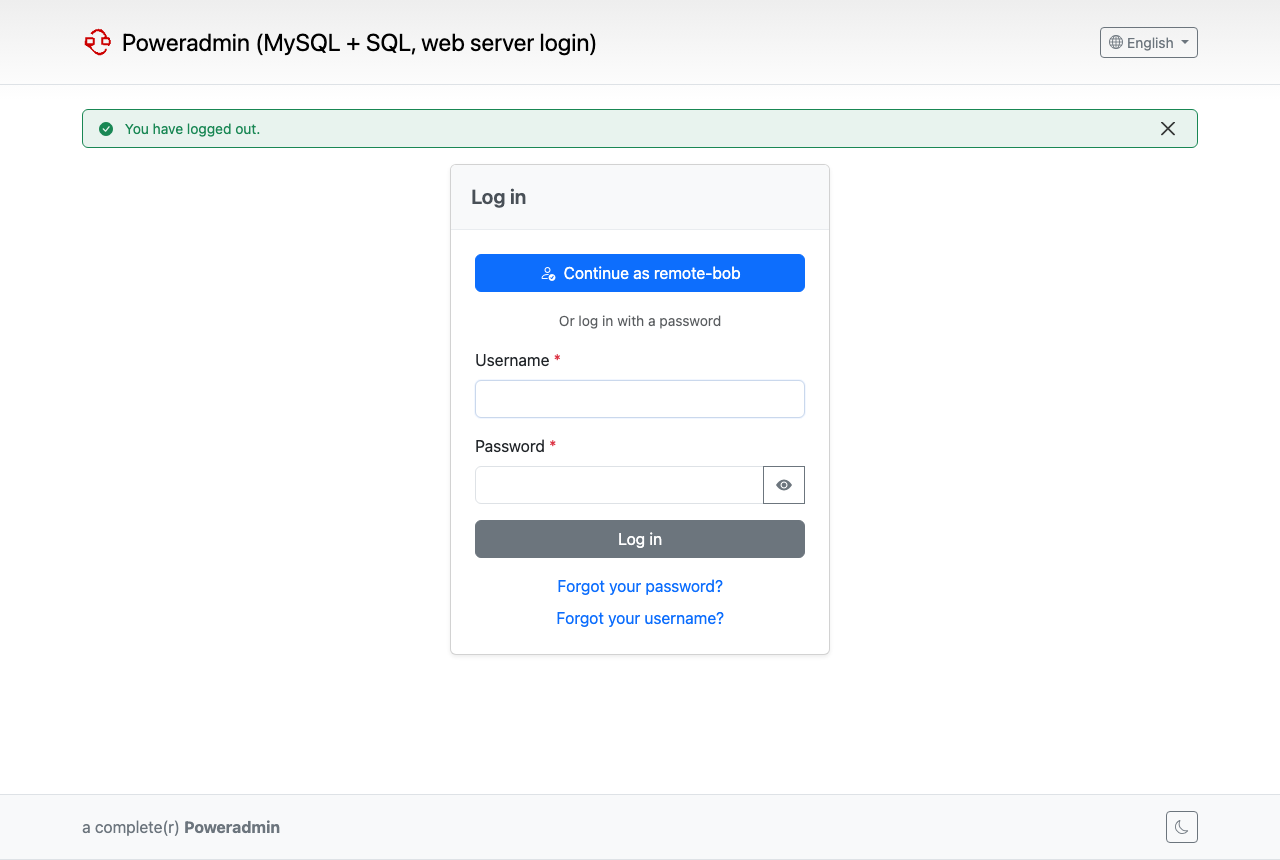
When the web server sends a user, the login page shows a Continue as hide_login_form on, the password form is hidden only while a web server user is present. Posted passwords still work, so a broken proxy cannot lock administrators out.
Logout
Logging out marks the session as signed out, so the user is not signed straight back in. The login page then offers Continue as
Set logout_url to send users to the proxy's logout endpoint instead, which ends the proxy's own session too. Examples:
- Authelia:
https://auth.example.com/logout - oauth2-proxy:
https://dns.example.com/oauth2/sign_out - mod_auth_mellon:
https://dns.example.com/mellon/logout
Examples
Apache basic auth
<Location />
    AuthType Basic
    AuthName "Poweradmin"
    AuthUserFile /etc/apache2/htpasswd
    Require valid-user
</Location>

# API v2 uses API keys
<Location /api/v2>
    Require all granted
</Location>
Apache with mod_auth_mellon
mod_auth_mellon sets REMOTE_USER and exposes SAML attributes as MELLON_* variables. The attribute names depend on your identity provider.
'remote_user' => [
    'enabled' => true,
    'email_attribute' => 'MELLON_mail',
    'name_attribute' => 'MELLON_cn',
    'groups_attribute' => 'MELLON_groups',
    'groups_separator' => ';',
    'logout_url' => 'https://dns.example.com/mellon/logout',
],
nginx auth_basic
Use the nginx configuration shown under Requirements and Security, with:
Authelia and oauth2-proxy (header mode)
Behind auth_request, the proxy sets headers such as Remote-User. Use header mode and list the proxy's address.
'remote_user' => [
    'enabled' => true,
    'header' => 'Remote-User',
    'trusted_proxies' => ['172.20.0.5'],
    'email_attribute' => 'Remote-Email',
    'name_attribute' => 'Remote-Name',
    'groups_attribute' => 'Remote-Groups',
    'permission_template_mapping' => [
        'dns-admins' => 'Administrator',
    ],
    'logout_url' => 'https://auth.example.com/logout',
],
The proxy must overwrite the headers. With nginx, copy the values from the auth response and set them with proxy_set_header, which replaces anything the client sent:
auth_request /authelia;
auth_request_set $pa_user   $upstream_http_remote_user;
auth_request_set $pa_email  $upstream_http_remote_email;
auth_request_set $pa_name   $upstream_http_remote_name;
auth_request_set $pa_groups $upstream_http_remote_groups;

proxy_set_header Remote-User   $pa_user;
proxy_set_header Remote-Email  $pa_email;
proxy_set_header Remote-Name   $pa_name;
proxy_set_header Remote-Groups $pa_groups;
oauth2-proxy uses different header names (for example X-Forwarded-User). Set header and the attribute settings to the names your proxy sends.
Docker
The image's Caddy server does not authenticate users itself, so in Docker this is normally used in header mode behind an authenticating proxy. Set the PA_REMOTE_USER_* variables. See Docker installation for the full list.
Troubleshooting
Nobody is signed in and the login page shows
- Check that
remote_user.enabledis on. -
In header mode, check that the proxy address, as PHP sees it, is in
trusted_proxies. With debug logging you will see:Behind a Docker network the address is the proxy container's address. IPv4-mapped IPv6 (
::ffff:10.0.0.5) does not match10.0.0.5. -
Check that the web server really sets the variable. Names starting with
HTTP_orPHP_AUTH_are refused, with this log line: -
A user name with spaces, control characters or more than 64 characters is ignored:
Ignoring unusable remote_user name ...
User is refused and no account is created
An account with that name already exists and its sign-in method is not web server. Either switch that account to web server sign-in (see Converting existing accounts) or rename it. Web server sign-in never takes over an existing account.
remote_user.default_permission_template must name a template that exists. A new user who matches no mapping is refused rather than given an arbitrary template.
The user is signed back in after logout
Without logout_url, the web server still sends the user, so Poweradmin offers Continue as logout_url to the proxy's logout endpoint to end its session as well.
API calls fail
Exclude /api/v2 from the web server's authentication. API v2 does not use this feature.